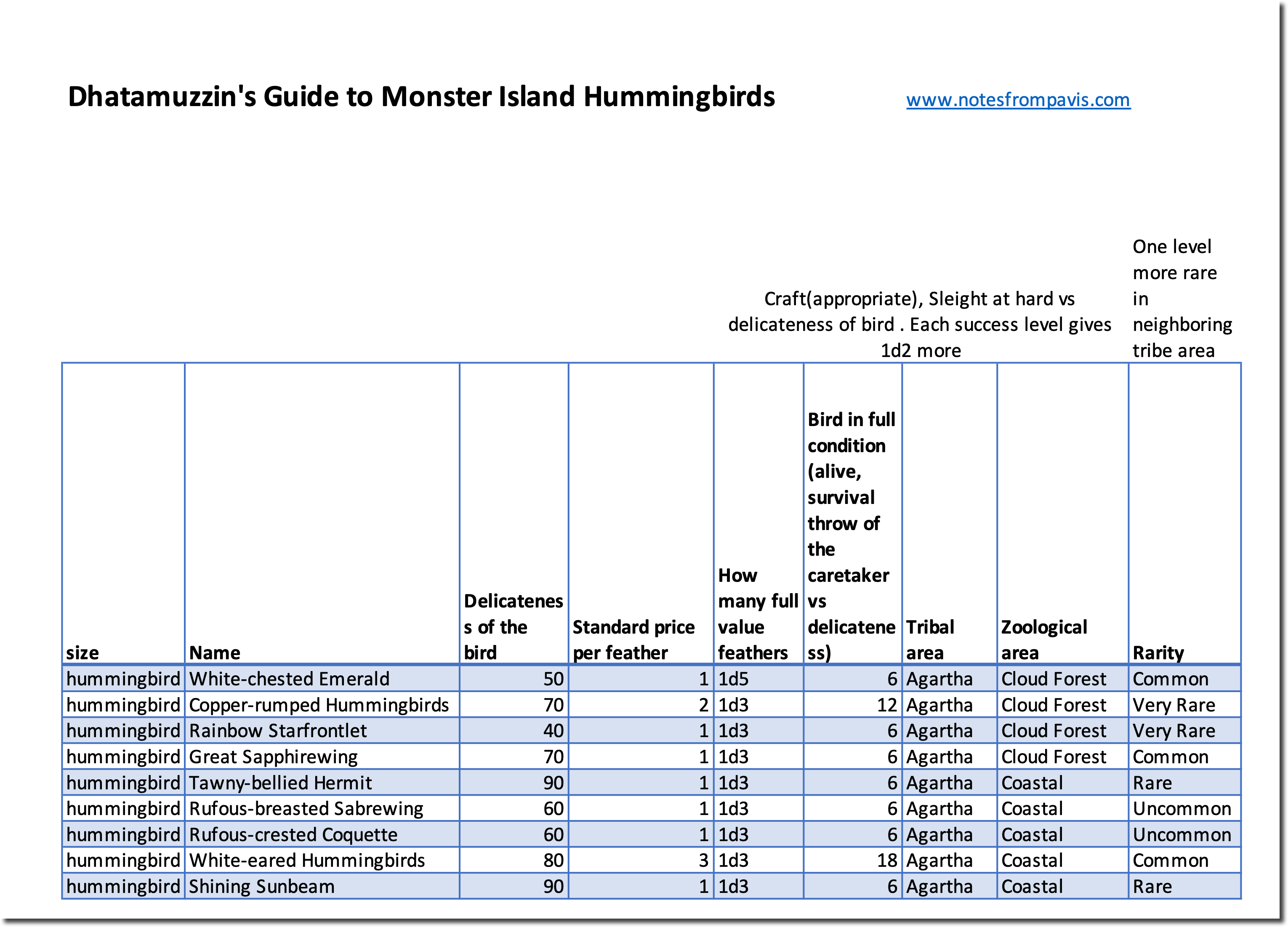
Item for Monster Island Campaign – Dhatamuzzin’s Guide To Hummingbirds of Monster Island

Here is an item from my Mythras Monster Island Campaign. It is the very rare copy guide to Hummingbirds of Monster Island. It was carefully researches by brave ornithologist Dhatamuzzin – who was lost in his latest travel to upper reaches of cloud forest in Komombo area in search of new subspecies of Prophet Bird. He used large part of his considerable inherited wealth to finance expeditions to inner Monster Island. His collection of bird feathers is beyond compare and is now being cared for in a private museum in the provincial capital.

The book contains first hand observations of the rarity of the birds, their living areas and delicateness of the birds for feather removal. It also contains market value researched which might fluctuate mightily. There is a Mandahi and Varanri Shaman curses put on Dhatamuzzin for his over zealous research in the vicinity of tribal holy places.
The link is here

Combat Style Cards update – Meeros and Dwarven Combat Styles and Separation of Firearms combat styles

The directory based combat style cards have been replaced by Combat Style Card Encyclopaedia

There is a small update on combat style cards. It contains now the Meeros Doomed combat styles. I added also a few Dwarven Combat Stylesinvented for Glorantha. I also updated all the cards separating all firearms related special effects to be applicable only for firearms. In addition there is now a strangle special effect from Fioracitta.

The new styles are for Meeros:

Brotherhood of Dust
Mercenary Infantry
Priestess of Myceras
Minotaur Gladiator
Kopashi Agent
Meerish Infantry
Meerish Slinger
Dark One Cultist

and for Dwarven

Dwarven Way of the Hammer
Dwarven Sound of the Axe
Dwarven Defender of the Wall
Dwarven Miner
Dwarven Crossbow Elite
Iron Dwarf Warrior
Dwarven Sapper
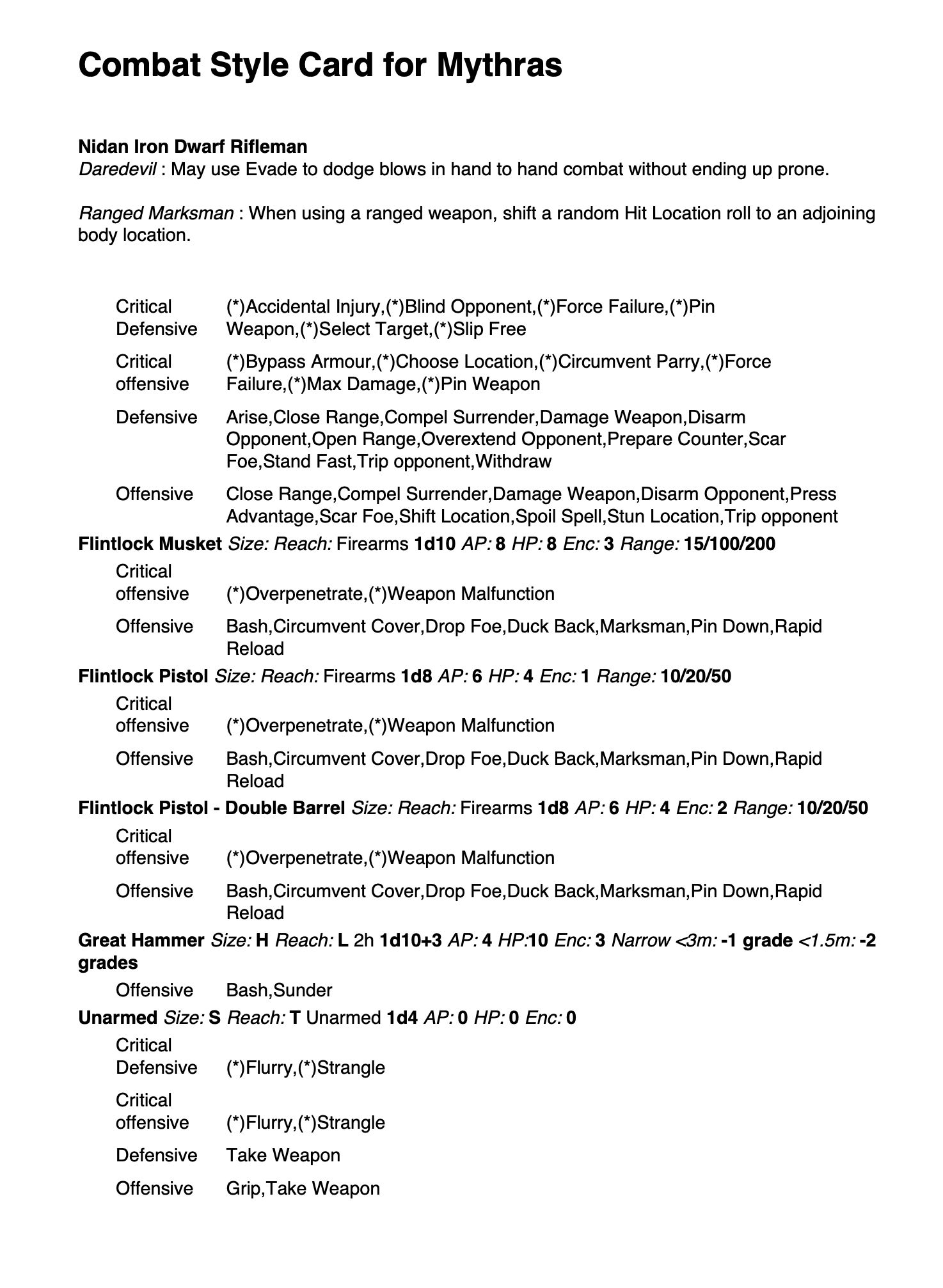
Nidan Iron Dwarf Rifleman

They can be found on the combat style card folder

Here is an example of Nidan Iron Dwarf Rifleman

The rest of the charts exist here.

There are other useful charts here

Tactics of selecting combat special effects in Mythras – a result based visualisation – next generation

After using the result based visualization and listening to feedback – here is an update on how to select the special effects.

Changes are

  • it fits into a single a4 – one for offensive and one for defensive special effects.
  • strangle special effect from Fioracitta added
  • all the special effects that are firearms only – marked so

How I use this – I printed it out and put it under plastic protective sheet – one to each side and a stiff cardboard in between. Now it is easy to keep on the table, text is big enough to see even on a4 and you are looking only at 1 a4 instead of 4.

Here are the defensive special effects and here the offensive special effects.

Latest versions of links are always in Mythras Charts and Tables page.

Tools.notesfrompavis.com is getting up, second service up. Revamp of UI

History

Few weeks ago I was hit with a really unexpected bill from my service provider and had to shut down the tools.notesfrompavis.com

Big thanks for the support from the tribe – the support is really appreciated.

I changed service providers after this, the cost per month and year for the service to run is higher but it contains no surprises.

The new hosting provider (I searched many) does not support the tools and frameworks I used to create the tools.notesfrompavis.com and I have had to go back to earlier tools I used. I will need to rewrite the Mythras JSON Tool and Mythras Skill Designer tool.

The present

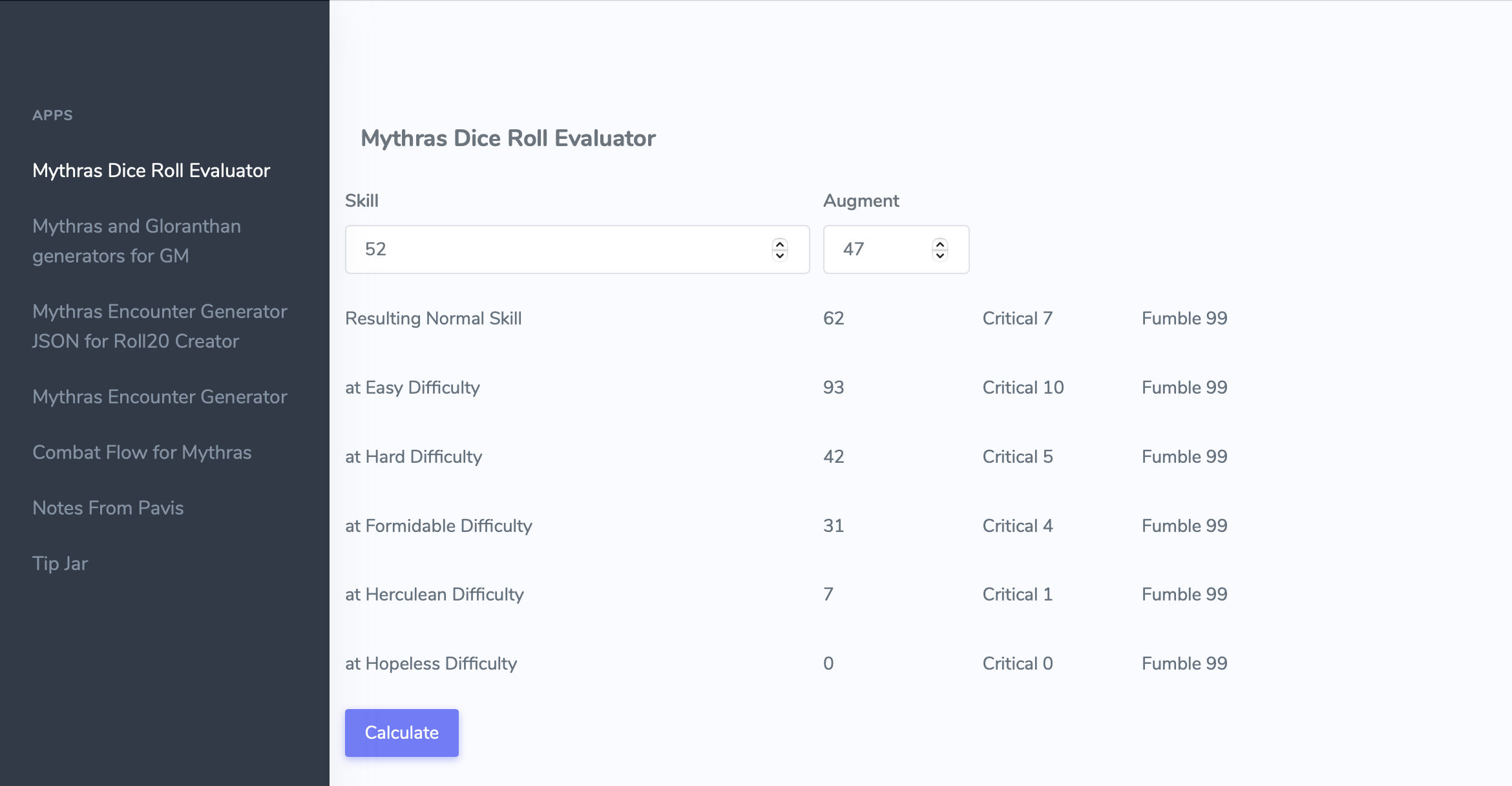
Second service is now up. It is a tool to help with Roll20 (and other tools) – the Mythras JSON Generator tool. It let GM’s search easily for the enemies in Mythras Encounter Generator and then generate a JSON that can be copied to Roll20 as an NPC.

You will also notice that the tool has completely revamped user interface. It also contains links to other tools of use to Mythras GMs.

The future

Next I will work on the remaining tool: Mythras Skill Designer – I expect it to be available around start of year.

Thanks for your support and patience

Tools.notesfrompavis.com is getting up, first service up

Few weeks ago I was hit with a really unexpected bill from my service provider and had to shut down the tools.notesfrompavis.com

Big thanks for the support from the tribe – the support is really appreciated.

I changed service providers after this, the cost per month and year for the service to run is higher but it contains no surprises.

The new hosting provider (I searched many) does not support the tools and frameworks I used to create the tools.notesfrompavis.com and I have had to go back to earlier tools I used. I will need to rewrite the Mythras JSON Tool and Mythras Skill Desginer tool. I have experimented with a few approaches and now think I know how to get them also available in near future, I hope.

First service that is up now is the original tools.notesfrompavis.com content from the summer. It It contains now only the original page (City Bad Night Encounter Seed Generator, Ship and combat unit generators, NPC look and feel generators, poisons, rumors, diseases etc).

Thanks for your support and patience

Mythras Character Skill Designer supports now Roll20 and helps select Combat Styles

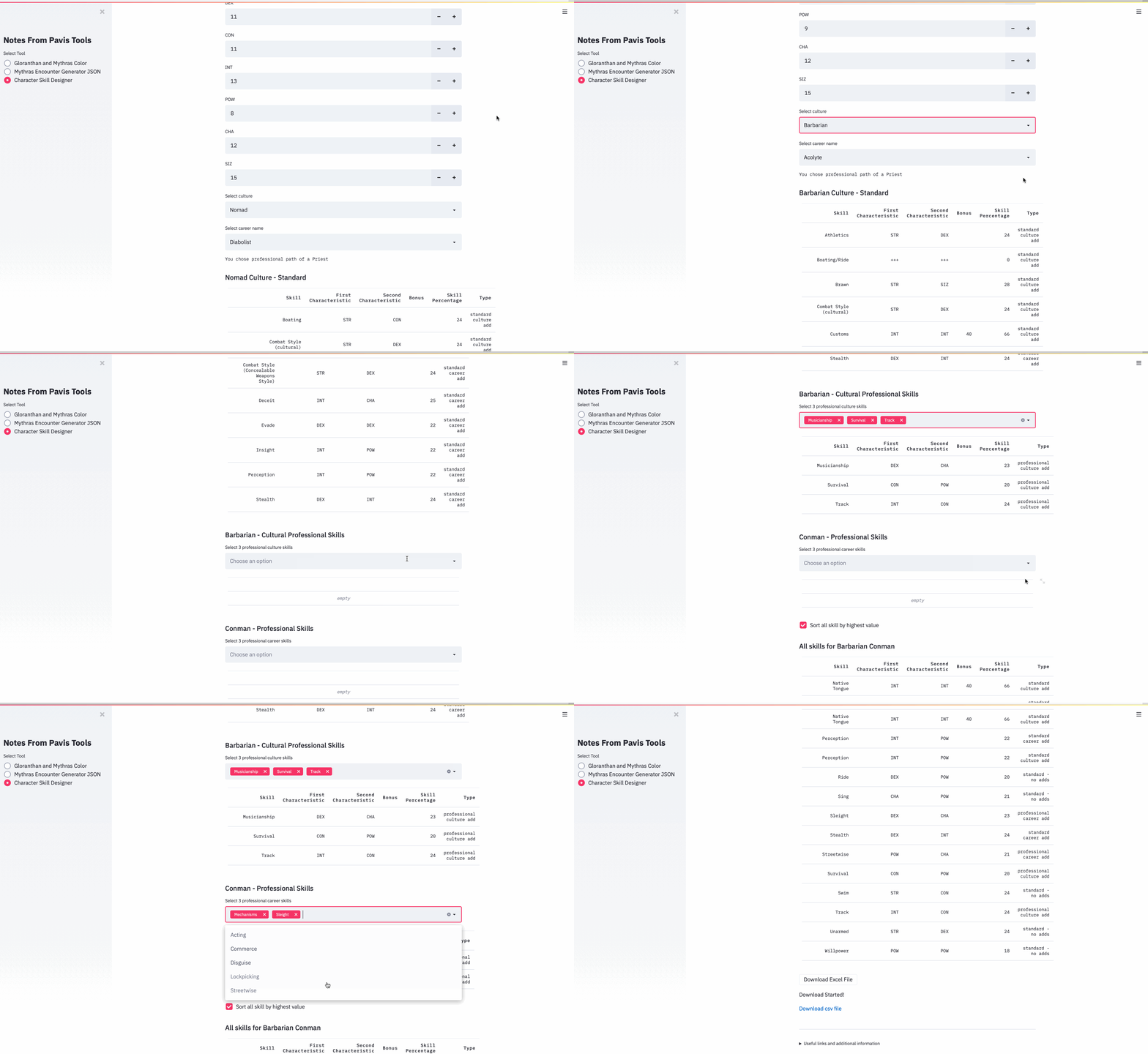
The Mythras Character Skill Designer (CSD) (Tools.notesfrompavis.com now makes it easy to create Mythras characters skills and export them to Roll20 and Excel.

Mark your character stats on the screen and start selecting the options.

Currently CSD supports the Mythras Core in creating the skills. Select your culture and career from the choices. After that you can select professional skills (3 for culture and 3 for career and 1 hobby skill). This can now be exported to excel or json for further work. From the excel you can copy by hand the skills and values to your normal character sheet wherever that is.

You can select the json export file contents and open roll20 and add a new character with Mythras character sheet and copy paste (=import) the json content there.This will create a character sheet with these skills and with some tweaking you are ready to play.

You can now also check what weapons and combat traits you would like to have from a set of combat styles from various sources. After selecting the primary source – select the area and then select the combat style from available

For example you could select as primary sources Shores of Korantia, Campaigns and Mythras, then select area Campaigns – From there you can select Hammer of the Beast. Which shows as weapons Ball & Chain, Great Hammer and Barbed Javelin with trait Batter Down. Currently only a list of combat style contents is shown, no skill or weapon stats are shown. The names and categorisations might be enhanced in the future and there might be additional combat styles. These combat styles might be used as is or used as inspiration for creating your own.

The combat styles will currently be copied also to Excel.

Mythras Character Skill Designer Makes Exploring Character Options and Creating Characters Easier

There is a new tool in early beta at http://tools.notesfrompavis.com/

If you want to design characters relatively quickly Character Skill Designer is there for you to help with the skills part. It (currently) helps to create cultures and careers from the Mythras Core.

It gives the player quick way to design the skill set. In Mythras RAW there is a set of standard and professional skills available per culture and career. Each culture also has different careers available.

So enter the characteristics (Str, Siz, Con etc…) in the tool

So for example if your player has dreamed of being a Nomad Diabolist from Northern Wastes CSD lets him pick Nomad as the culture, Diabolist as a profession. After this tool let’s you select the right amount of professional cultural and career skills (which is max 3).

Next it let’s you see all the skills (including the standard skills that were not available with the culture/profession). The CSD calculates the base percentages for the skills and let’s you sort them by skill% to see how the skills fit players view and where to add cultural or career points.

The skill template has a note for each skill about whether you can use cultural or career points or whether it is just standard. When you are satisfied with the skill combination you can download that as a CSV file.

This will be developed further. There might be some bugs in the combinations, feedback welcome

Example of usage