Opposed: higher Success Level wins | tie → higher roll | both fail → GM | >100% subtract excess
Differential (for example combat): Both roll; compare Levels of Success (Crit > Success > Fail > Fumble); higher level gains advantage equal to the difference, ties give none.
Luck (1/action): re-roll, extra AP, reduce Major Wound, swap digits, last act
Passions: 1–100 | +20% | roll to compel | oppose each other | resist mental/magic control
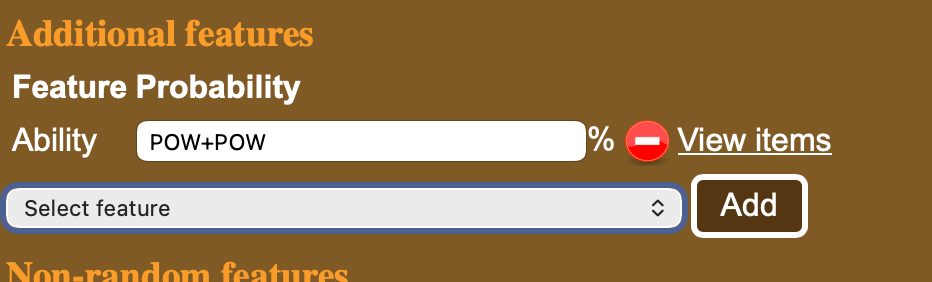
When creating new opponents and creatures in MeG one can add either a fixed or a random feature for the creature.
Here we could add random ability that is POW+POW likely to appear for the creature from the ability feature list.
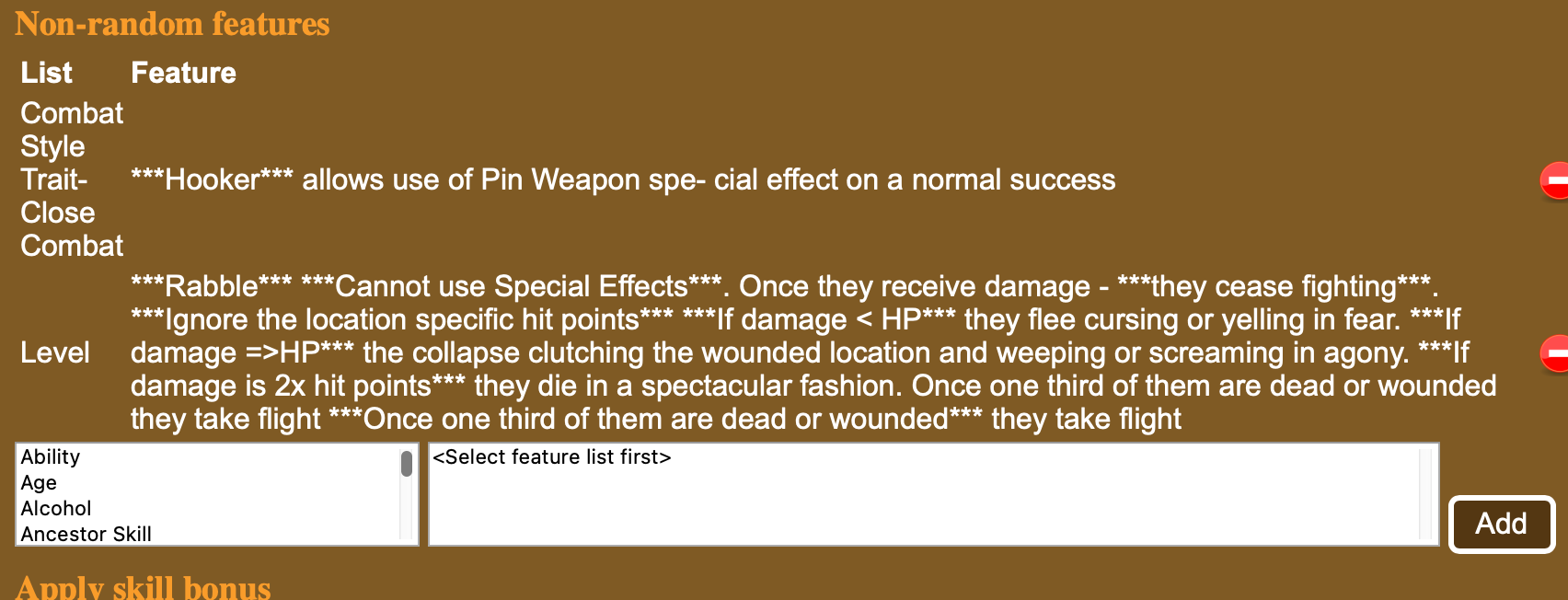
Here is a way to add specific feature. From Combat Style Trait-Close Combat feature list the Hooker is chosen as well as from Level list the Rab´ble is chosen. You could add several from the ability list by clicking on the ability and selecting the one you want and add it with the button
You can view the other possible items in the list with view items above or selecting the left hand side list (for example Ability) and scrolling down.
Here are some newly added ones.
Creature abilities
There are now more than 150 Creature abilities you can add to the creatures in MeG. Check the Features – Abilities.
The following ones come from Thennla supplements (Khakun Shrugs, Sorandib and others) .
Aura of Dread Upon first sight of him, onlookers must make an unopposed Willpower roll. On a failure, the character cannot act for one round. On a success, the character may act, but all rolls are one difficulty grade harder for one round. With a critical success, the character may act normally. With a fumble, the character may not act for 1d4+1 rounds.
Bloodless Does not bleed when cut and is immune to the Bleed Combat Manoeuvre.
Fluid Motion Ignores SIZ restrictions for abilities like Engulfing; moves fast in non-solid material
Horrifying Dreams This effect costs 1 MP to invoke. Unless the targeted character succeeds in an opposed Willpower roll he will suffer 1 point of damage to the head per round until he makes an unopposed Willpower check or 6 rounds pass.
Immune to Bleed
Immune to Stun Location
Psychic Attack 1d8 Damage to Magic Points. Does not cost Magic Points to use
Sonic Scream The scream covers a cone CON in metres. width of the cone is one quarter of the CON. Any in the cone suffers sound-based damage to all hit locations, Evade halves. A creature can only scream once in a specified time period (usually once per hour or once per day). Further attempts to scream within this time require the creature to pass Endurance rolls with each roll becoming one grade harder, or suffer a level of Fatigue. It inflicts damage equal to its Damage Modifier, even to solid objects made from ceramics and obsidian.
Spirit Abilities
There are now 48 Spirit abilities you can add to the spirits – check Features > Spirit Abilities. Following are the newly added.
Craving
The spirit can turns its victim’s darkest Passion into a Compulsion (p. 91). If the victim has no darker Passions, the spirit latches into the noblest Passion and corrupts it into an extreme form – turning Love (Childhood Sweetheart), for instance, into a Compulsion where the victim becomes excessively clingy and cloying, or domineering and controlling.
Source: Fioracitta
Drain
The spirit can drain its victim of some of their life essence, effectively inflicting a level of Fatigue as if they were suffering from blood loss (Mythras Core Rulebook, p. 71). This Fatigue is recovered at a rate of one level per day of complete rest. The spirit gains 1d2 Magic Points from this drain. The target resists with Endurance.
Source: Fioracitta
Weave
(similar to Demesne but the Weave distorts the spiritual and physical world within its area of effect and allows its other abilities to affect corporeal beings and spirits). Domination (creatures with INS or plants within its Weave, or people it has overcome in Spirit Combat and corrupted). Discorporate (only sleeping sapient creatures within the demesne of its Weave).
Source: Bird in Hand
Corrupt
(inflicts mutagenic features as a consequence of defeating them in Spirit Combat, randomly generate feature from Mythras page 275¸ it may also Dominate defeated victims).
Source: Bird in Hand
Endowment
Grant creature abilities (e.g., Flight, Venom) to the binder
Source: AiG
Grind
Dust Elemental or Spirit – Grind opponents with larger pieces of stone and grit whirling within its form, using its Damage Modifier to inflict wounds.
Source: Sorandib
Neutralise
Neutralise any power or condition rune. Allows spirit to counteract the magic or supernatural ability of an attacking creature or spirit tied to specified power or rune, providing the POW of spirit is greater than that of attacker
Source: AiG
Pain
Inflicts a possessed victim with grinding aches in their body which flare into shooting pain when he or she moves quickly or tries to concentrate. Any skill roll by the host must be equal or below Willpower else it fails due to distraction
Source: AiG
Smother
Dust Elemental or Spirit – It may attack any target within its volume with a Smother attack at a cost of 1 AP, and maintain the effect against several targets simultaneously at a cost of 1 AP per target per round. Victims must each spend 1 AP per round to defend against the attack.
Source: Sorandib
Steadfast
The spirit gains immunity to dismissal of any form. This does not mean it is immune to magical damage or spirit combat only that spells such as Banish or Exorcism do not affect it
December has been a busy month behind the GM screen. Since December 2nd, ToolsFromPavis has picked up a bundle of improvements aimed.
⚡ MeG Encounter Library: Fast Enough to Disappear
The Encounter Library has had a serious performance tune-up.
Infinite Scroll & Paging Browsing large encounter catalogs no longer drags your browser into the mud. Encounters now load in fast 200-row batches with HTMX-powered infinite scroll, keeping everything responsive even with thousands of entries.
Source Transparency You can now see exactly where your data comes from, live database or validated cache, plus how fresh it is. Live “Read X minutes ago” timestamps make it obvious what you’re looking at.
One-Click Combat Tracker A new “Combat Tracker from Initiative” button in Initiative Wheel page lets you turn your current Initiative Wheel state directly into a markdown Combat Tracker session ready to add to your Obsidian . This is just first version
Clearer Initiative Flow Small visual improvements help follow the initiative. Pulsing turn indicators and clearer font sizing make it obvious whose turn it is, even in busy encounters.
📝 Obsidian Statblocks & Content Tools
Exports are now cleaner, richer, and better aligned with Mythras rules.
Customizable Links Choose between visible links for navigation-heavy notes or plain text for clean reading and printing.
Improved Size & Build Descriptions Creature exports now use proper Mythras SIZ bands with narrative size descriptions. Humanoids also receive body-build descriptors plus randomized height and weight from Mythras RAW.
Smarter Naming Logic Exported filenames are cleaner and more predictable. Character Sheets, for example, now automatically gain a “-CS” suffix, making Obsidian folder hygiene much easier to maintain.
Statblock API Throttling The API now includes rate limiting to keep everything stable and responsive, even under heavy use.
Improved Error Integrity and lots more tests.
🎨 UI, UX, and Mobile Polish
Small refinements that add up at the table.
Unified Help HubAll tools now link into a single, theme-aware help system that respects your Light or Dark mode choice.
Mobile Tweaks Menus, spacing, and tooltips have been tightened up so the MeG Encounter Library and Initiative Wheel behave properly on phones and tablets, whether you’re GMing from a laptop or a side table.
Firefox tuning. Small tuning for Firefox browser
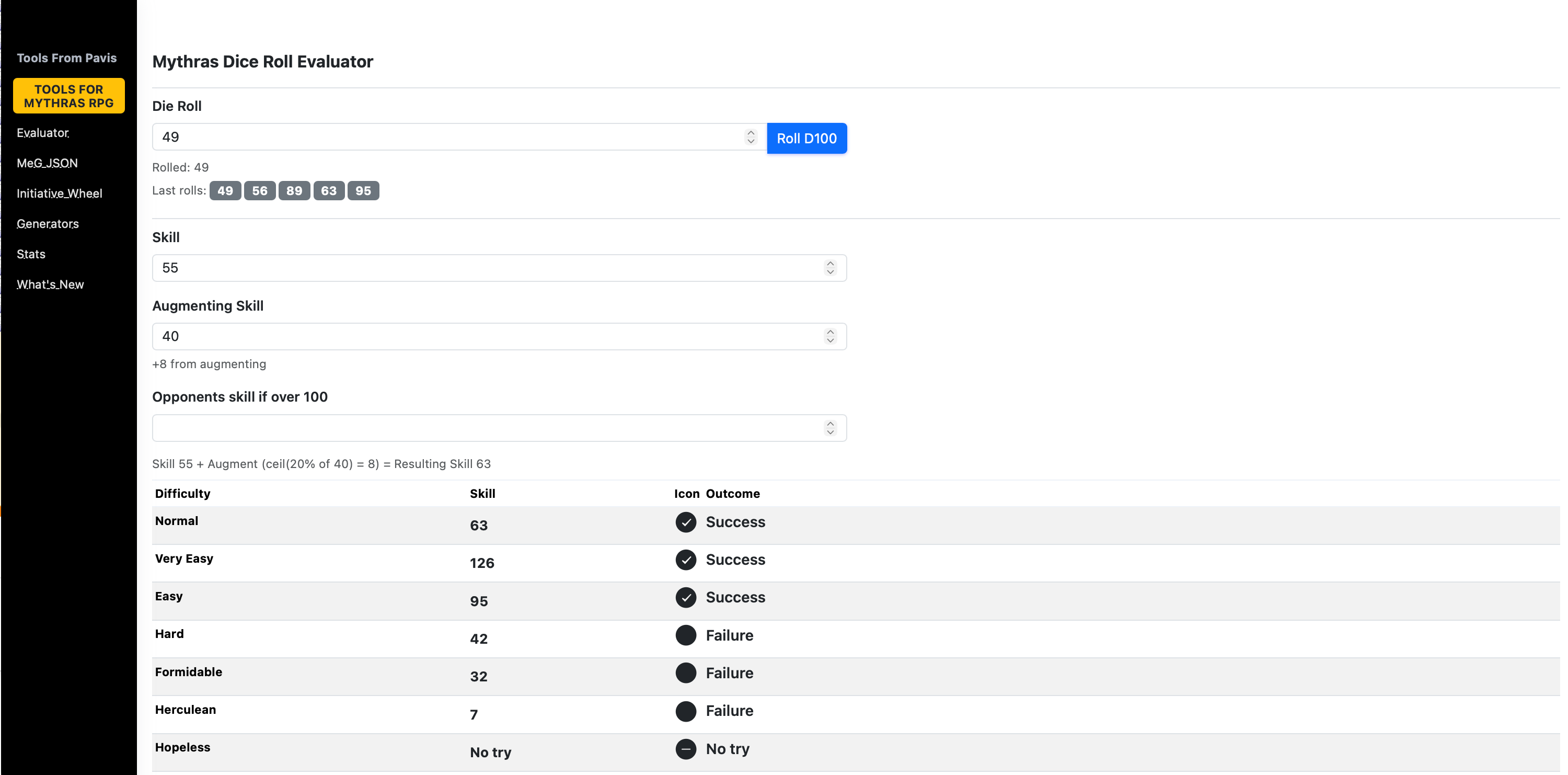
Dice roller updates – shows 5 last rolls. Some tuning of the UI.
As always, thank you for using ToolsFromPavis and for the steady stream of feedback, bug reports, and playtest abuse. The tools keep evolving because real GMs keep pushing them in real sessions.
This update continues the steady work of tightening Markdown output, improving reliability, and adding options that help GMs shape content to their preferred table format. All changes come directly from practical use of the MeG data pipeline and repeated testing in Obsidian.
At a glance
New Character Sheet output mode for Mythras statblocks generated from MeG data.
Markdown link rendering options: choose visible Markdown links or plain text.
Clearer filenames for Character Sheet exports (“CS” added automatically).
Formatting fixes across multiple generators for cleaner and more consistent output.
Markdown correctness fixes, especially in AP/HP sections.
Performance and reliability improvements in Markdown generation and preview.
Character Sheet mode (Obsidian Markdown / Preview)
When exporting MeG encounters to Markdown, you can now choose between the standard statblock format or a Character Sheet layout.
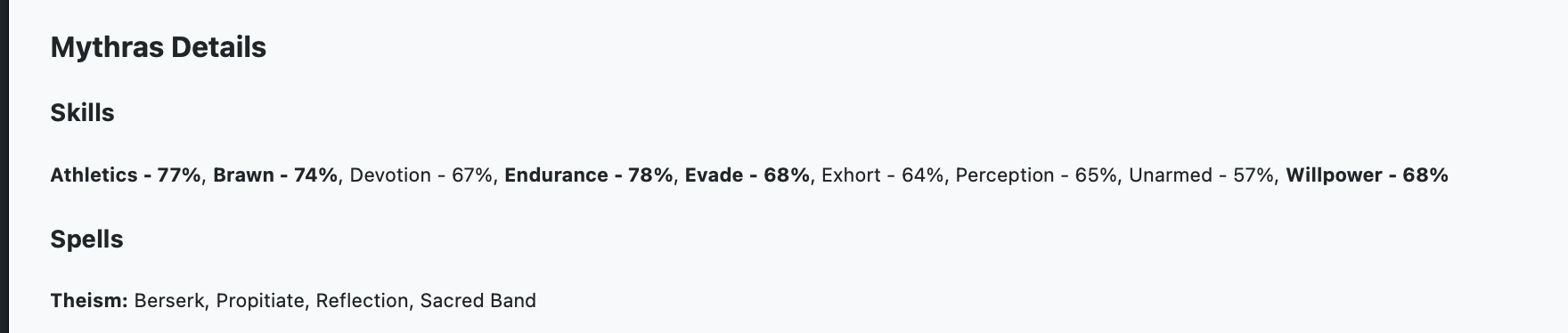
Standard Enemy Markdown
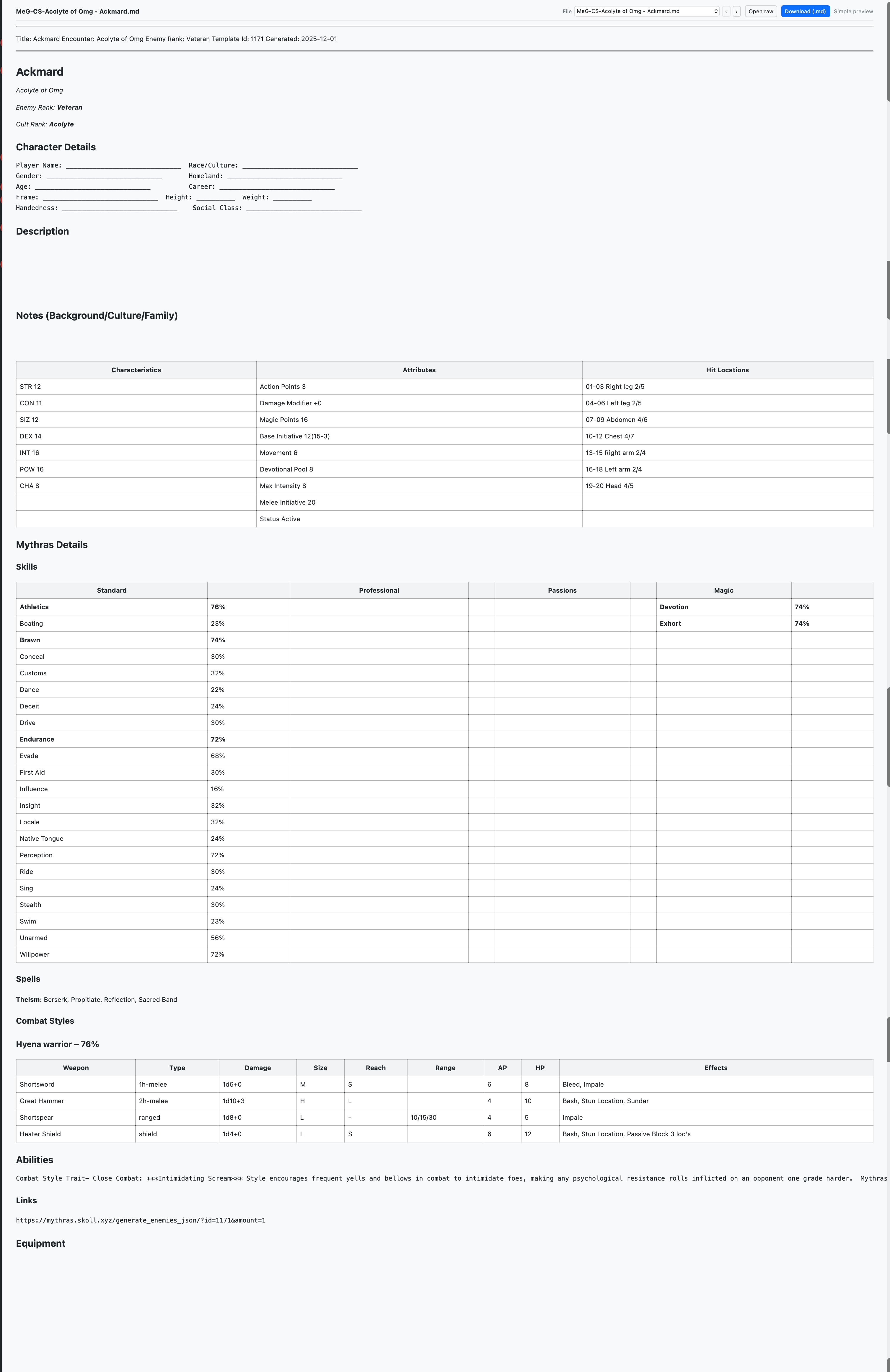
The Character Sheet option reorganizes the material to follow structure of a Mythras character sheet, which could help to create pregens for an adventure – try for example tag Core Codex or Pregen
Character Sheet exports automatically add “CS” to filenames so they stand out in your session files and downloads.
Link rendering options (Markdown)
A new toggle allows you to decide how links should appear in generated Markdown:
Visible links retain normal Markdown link markup.
Plain text removes link formatting for those who prefer simpler reading or cleaner printing in Obsidian.
Generator formatting
Several generators received formatting adjustments to keep headings, spacing, and lists consistent across outputs.
These changes aim to produce more predictable Markdown, especially when combining content from different generator types.
Markdown correctness fixes
AP/HP sections now render with the correct labels and layout, avoiding previous alignment issues.
Additional small corrections address bullet spacing, code block boundaries, and section ordering in a few edge cases.
Performance & reliability
Markdown generation and preview now complete more quickly, especially for large MeG encounter sets.
Stability has been improved for longer sessions and heavier loads, reducing slowdowns during repeat exports.
Getting started
In the MeG Encounter Library, generate any encounter as usual.
Choose Markdown export.
Pick your preferred layout: Standard or Character Sheet.
Select your link style: Visible or Plain text.
Download or preview. Character Sheet files will include “CS” in the name for easier sorting.
If you notice anything unexpected in this update window, feel free to report it and it will be reviewed.
This summary covers updates released between Nov 23–27, 2025, plus one Generators UX change on Nov 26. All changes draw directly from user feedback and repeated tabletop use. The tools remain intended primarily for larger screens, but several areas now respond more smoothly when used on phones or tablets.
At a glance
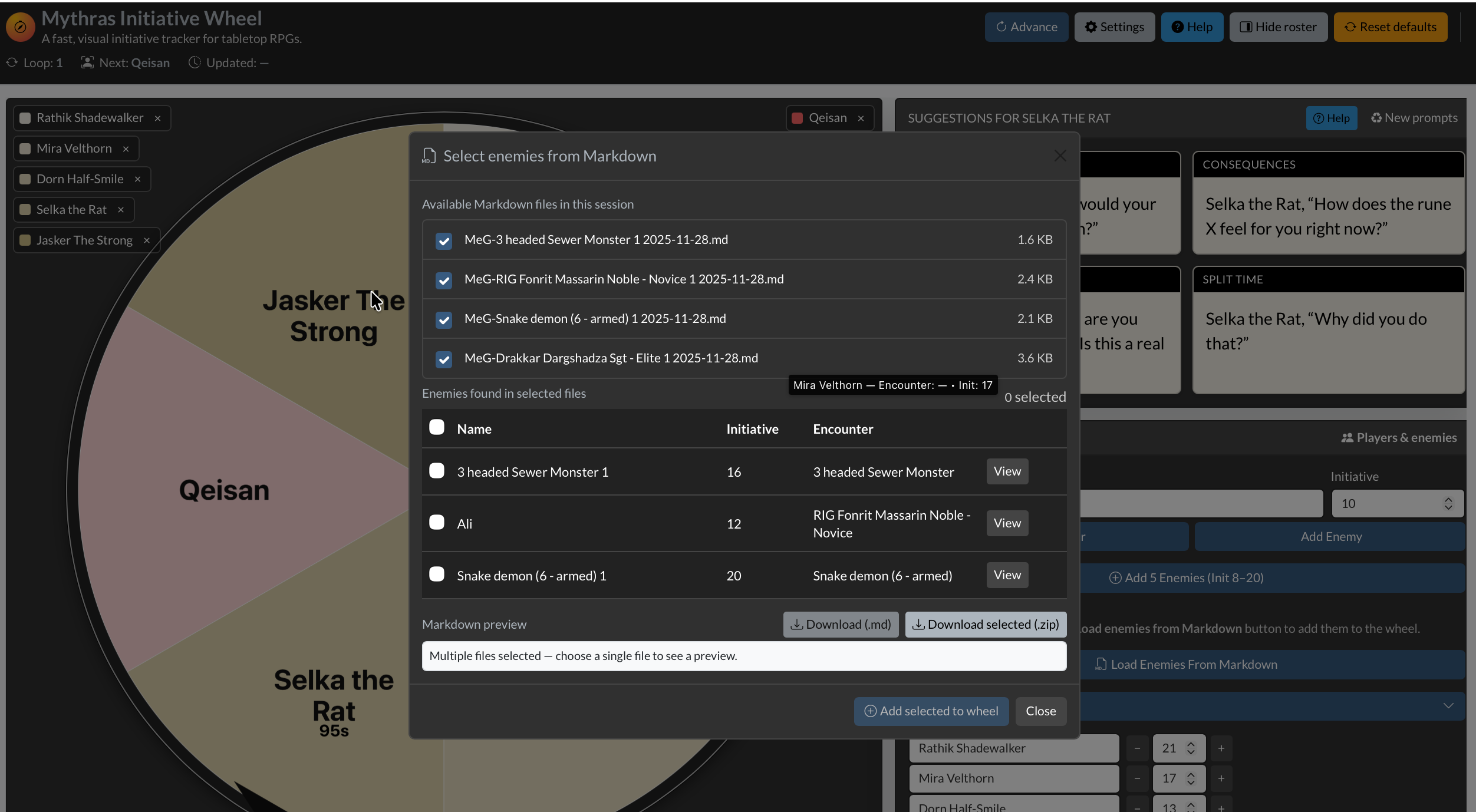
Initiative Wheel: clearer turn cues, steadier roster behavior, tweakable suggestion batches, and import of enemies from Markdown created in the MeG Library.
MeG Encounter Library: improved responsiveness, better reliability, and smoother navigation.
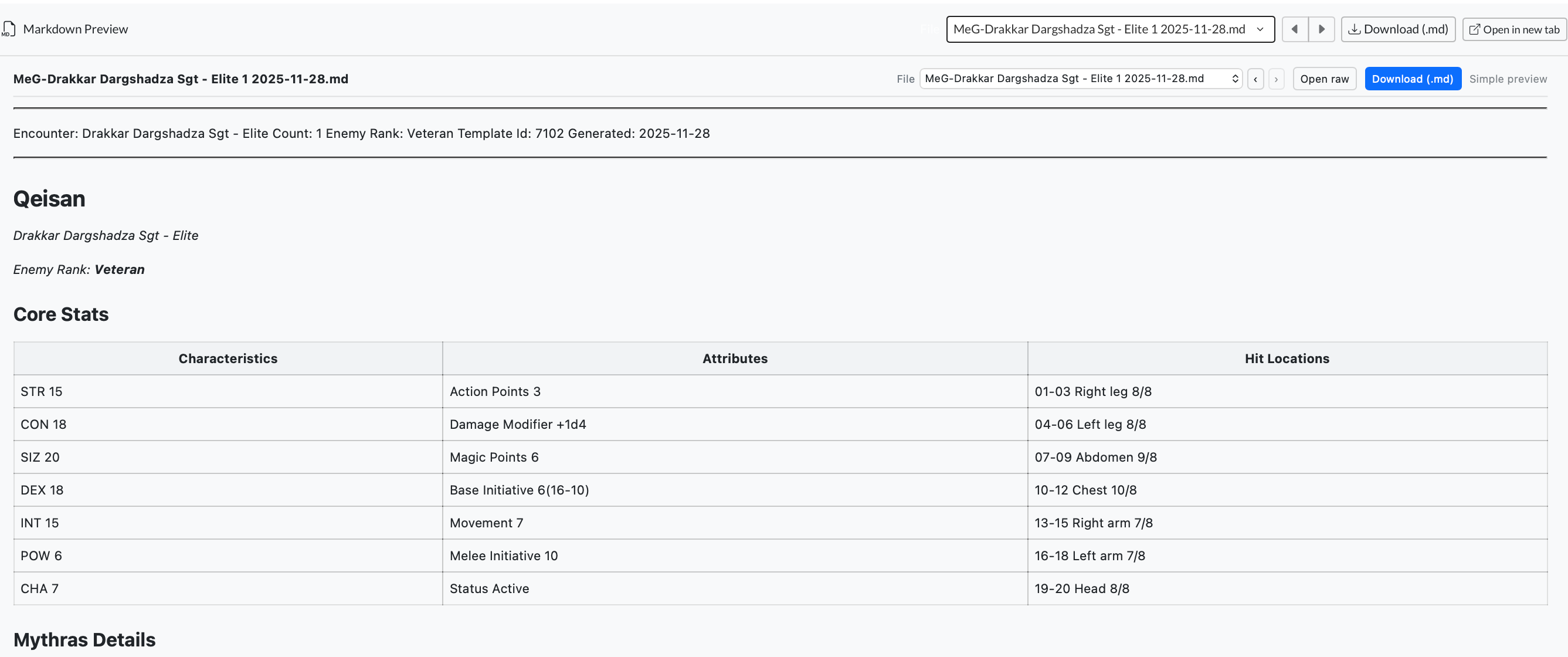
Markdown Preview & Obsidian Export: direct download, template access, and easier movement between preview outputs.
Generators Hub: simpler index view; quantity selection happens on each generator’s page.
Files & Recent Items: fewer duplicates and more consistent visibility.
Site-wide: reduced bot load, steadier caching, and clearer error pages.
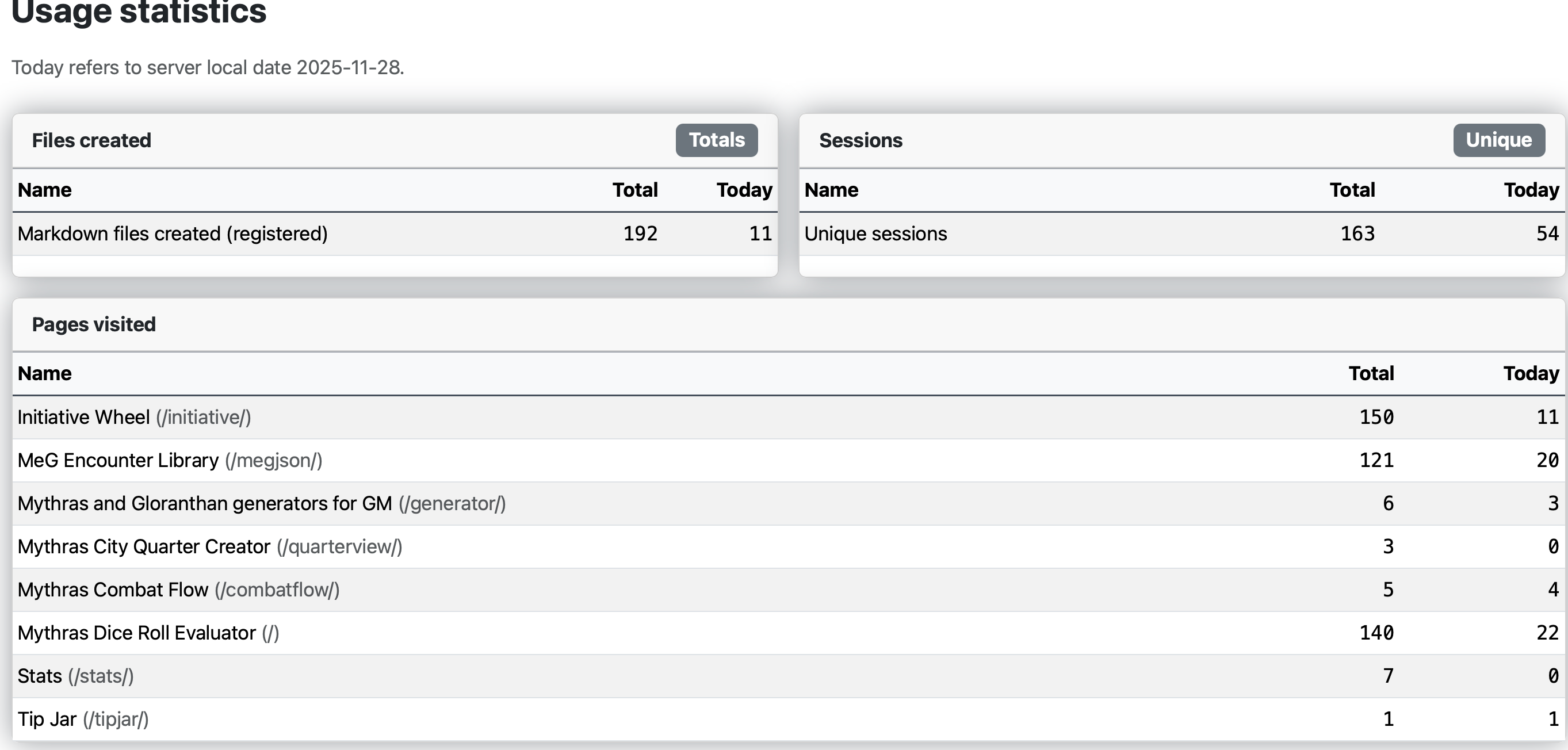
Tip Jar / Stats: updated text and steadier daily capture.
Initiative Wheel (/initiative)
Interface responds more smoothly on smaller devices while still being designed for real use on laptops or tablets at the table.
Roster improvements: enemy groups expand automatically when they contain entries; selection updates feel steadier.
Clearer turn-ending indicator and a subtle highlight on the active segment.
Controls made consistent across views, plus minor stability adjustments.
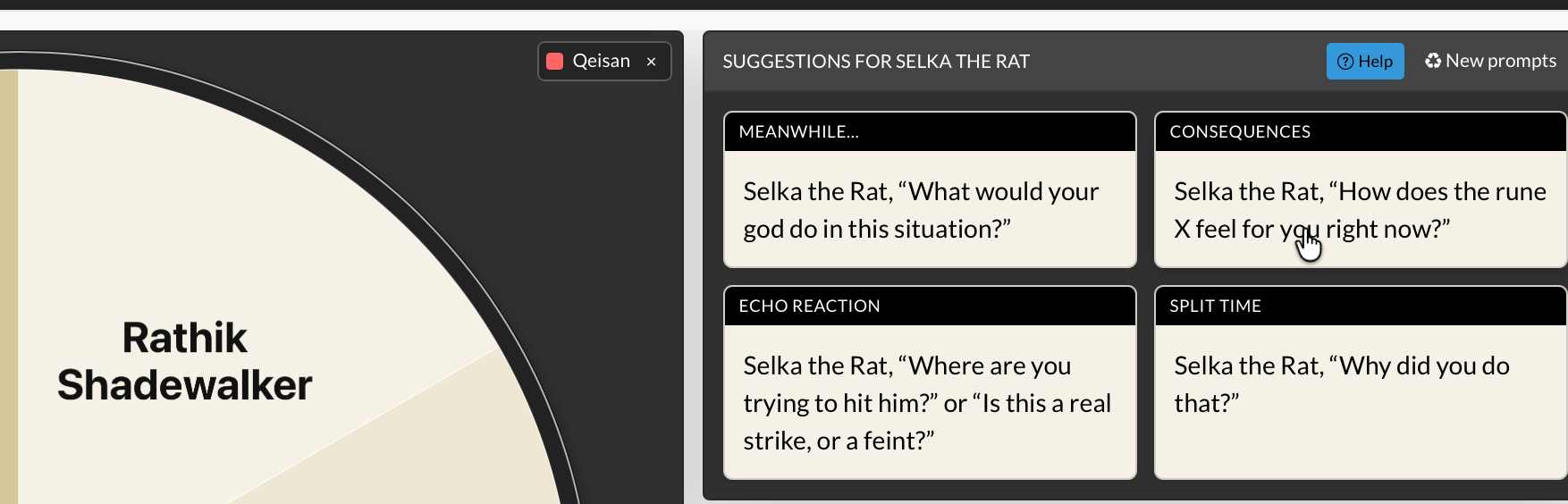
Suggestions moved to the upper-right. Their count can now be tweaked in Settings.
Larger wedge labels for easier reading across the table.
New feature: import enemies directly from Markdown produced in the MeG Library.
Navigation updated so you can flip through recent Markdown previews without leaving the Wheel.
Community notes:
Hypnotician (Reddit): “That is unbelievably helpful. You have no idea. Thank you.”
Matt_E (Mythras Discord): “Hannu, this is kind of amazing. Thank you!”
MeG Encounter Library (/megjson)
More responsive across devices, keeping the layout readable even when space is limited.
More predictable menu behavior and consistent placement of MeG-related navigation.
Stability improvements to prevent disappearing entries in Files and to keep recent items reliable.
Navigation improvements so you can flip through Markdown previews while reviewing encounters.
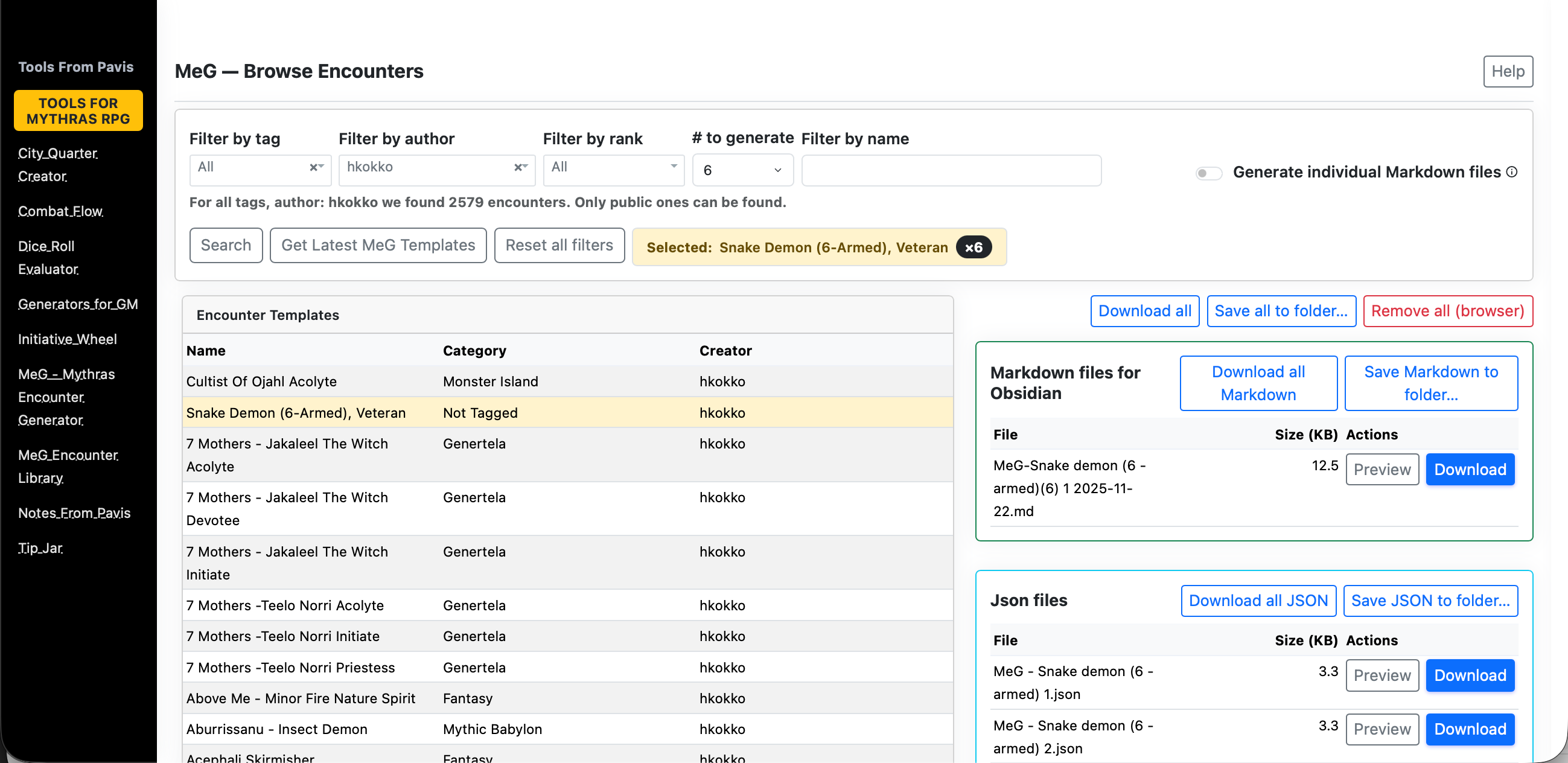
The MeG Encounter Library at https://www.toolsfrompavis.com/megjson/ has been enhanced to pull ready-to-run Mythras opponents into our prep. This update focuses on reducing friction: clearer browsing, predictable filtering, reliable generation, and smoother hand-off into Obsidian or your VTT. Everything you create stays tied to your current browser session, so prep flows naturally from idea → statblock → notes.
Overview
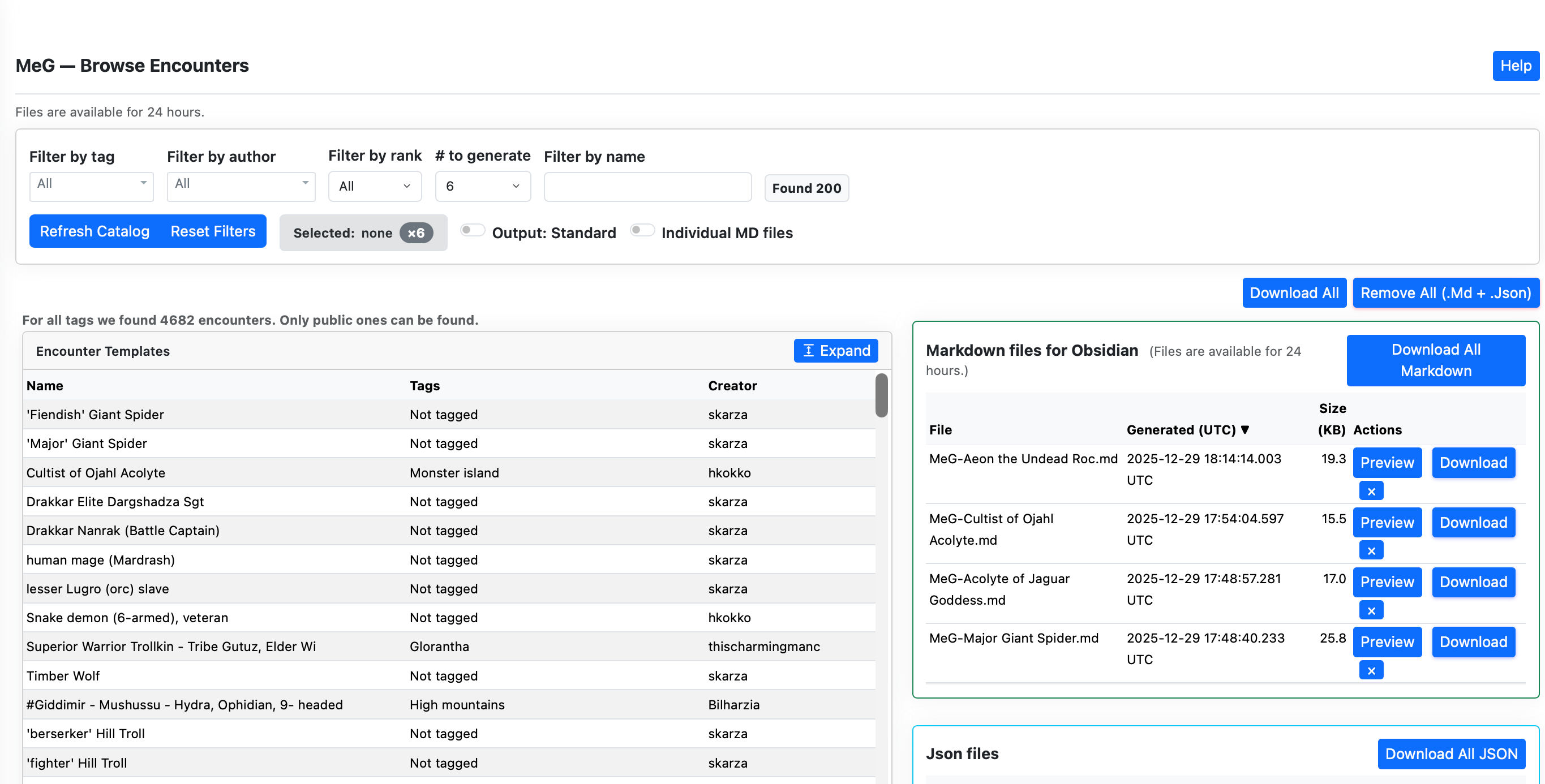
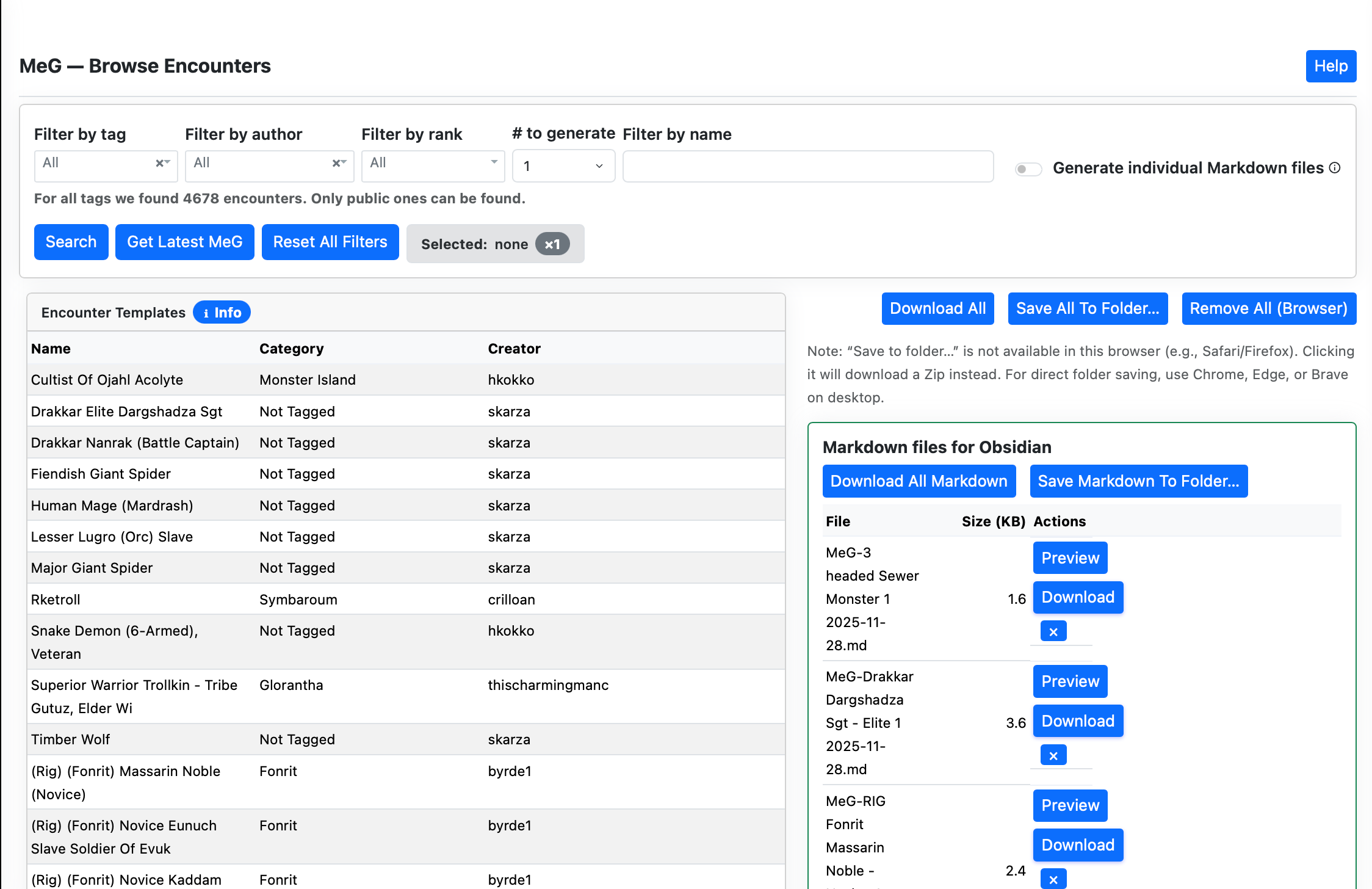
The MeG Encounter Library lets you browse and filter a catalog of ready-to-run Mythras opponents and creatures, then generate encounter artifacts (Markdown and JSON) for use in your session.
Browse with filters by Tag, Author, Rank, and Name contains.
Select an entry and choose how many opponents to generate (1–8).
Generate to produce Obsidian-ready Markdown and JSON into the current session.
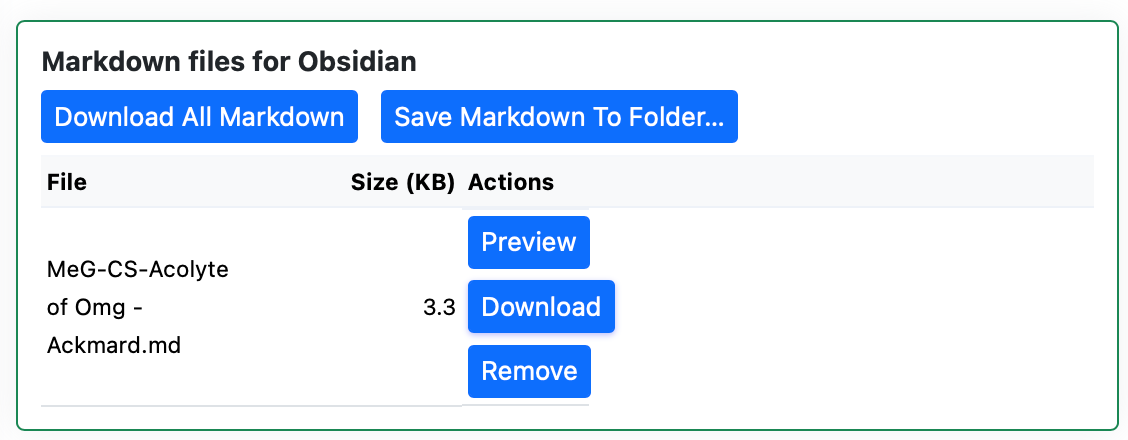
Manage your session’s files: preview, download, zip, or remove.
Type a few letters in the Name field or pick a Tag/Author/Rank.
Set count – default is currently 6. Click a row to select it
Find the created files in the Session Files panel; download or preview as needed.
The selected filters stay in your browsers’ local storage.
Browsing and filtering
Name contains — free-text filter that matches encounter names.
Tag — category/tag dropdown (“All” shows everything public).
Author — authors available under current Tag/Rank/Name filters.
Rank — available ranks under current Tag/Author/Name filters.
Reset Filters clears all filters back to defaults.
Refresh Catalog forces a fresh reload of the MeG catalog (bypassing cache).
You can also produce markdown either one enemy at the time or multiple using selection button.
Selecting and generating
Click a table row to select an encounter. The row becomes highlighted and selected number of enemies in both markdown and json is generated
Your current filters, sorting, and page are preserved when selecting a row — selecting does not change filters.
Even if your filters would normally hide the selected row, it will stay visible at the top until you change the selection.
Count — number of opponents to generate (1–8). Values outside this range are clamped.
Name override — optional; if provided, it is used as the output name.
If the backend can only produce a partial set (e.g., 2 of 4), a notice appears. You can retry to fill the rest.
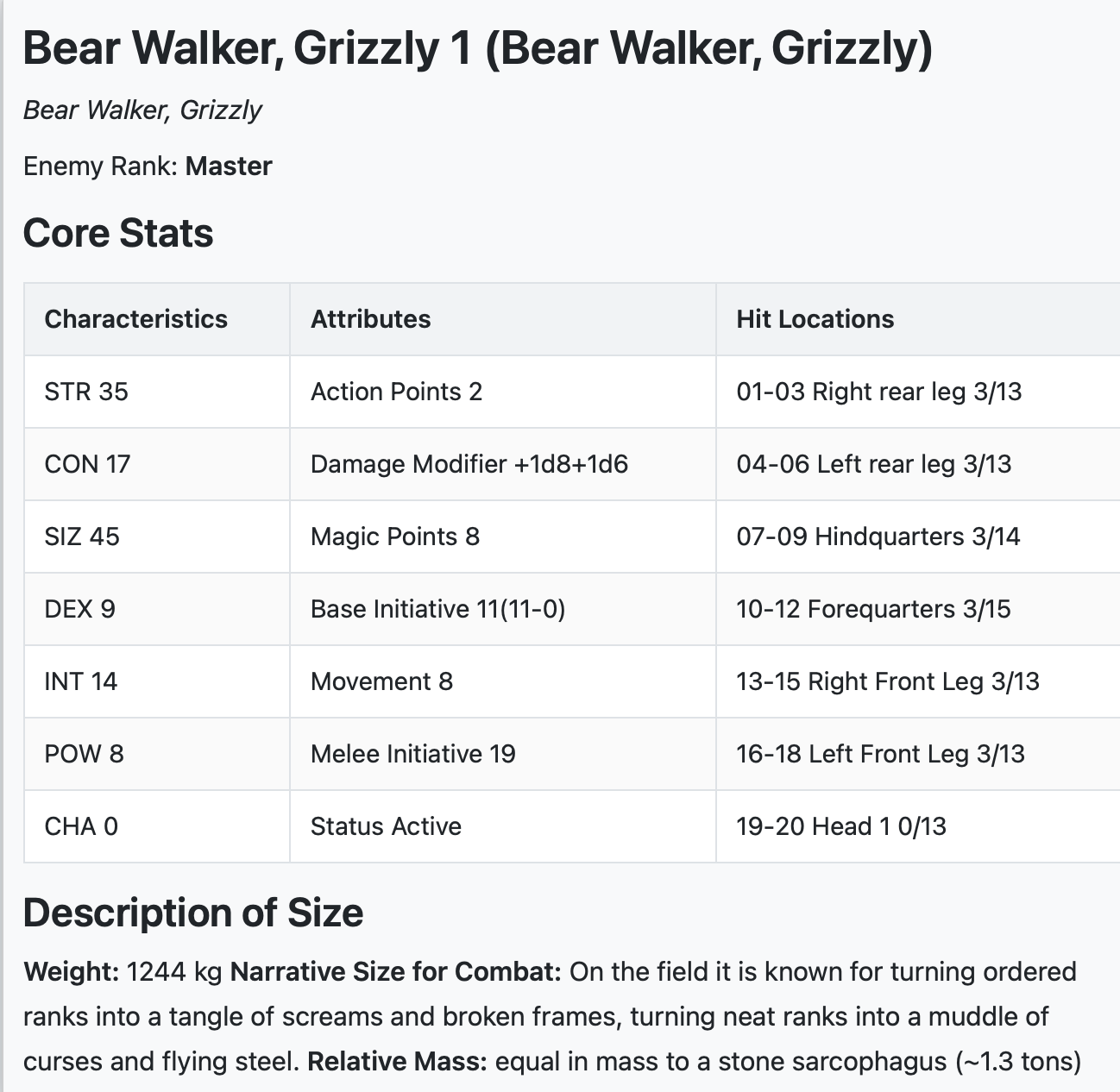
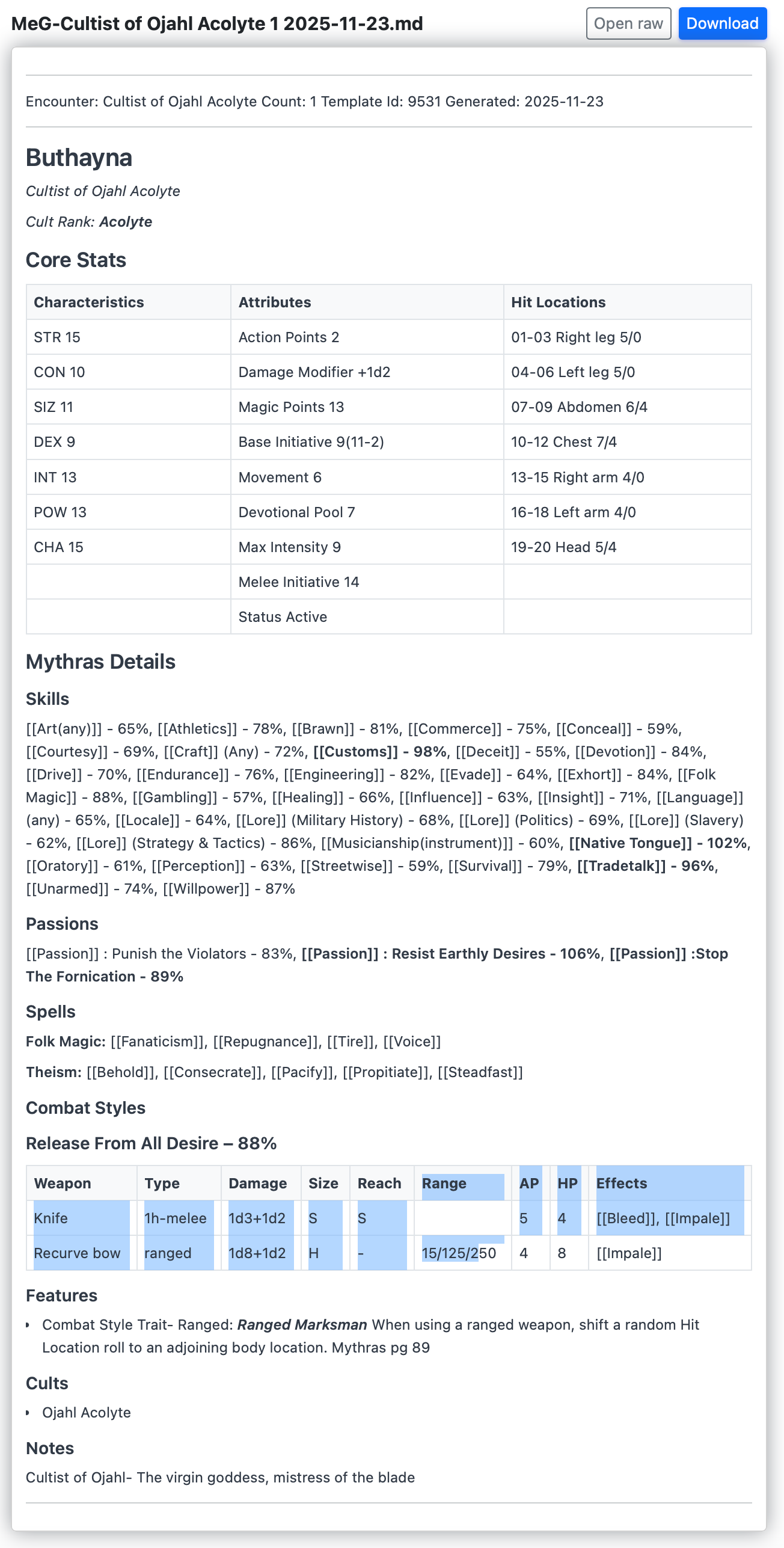
The preview of markdown looks like this.
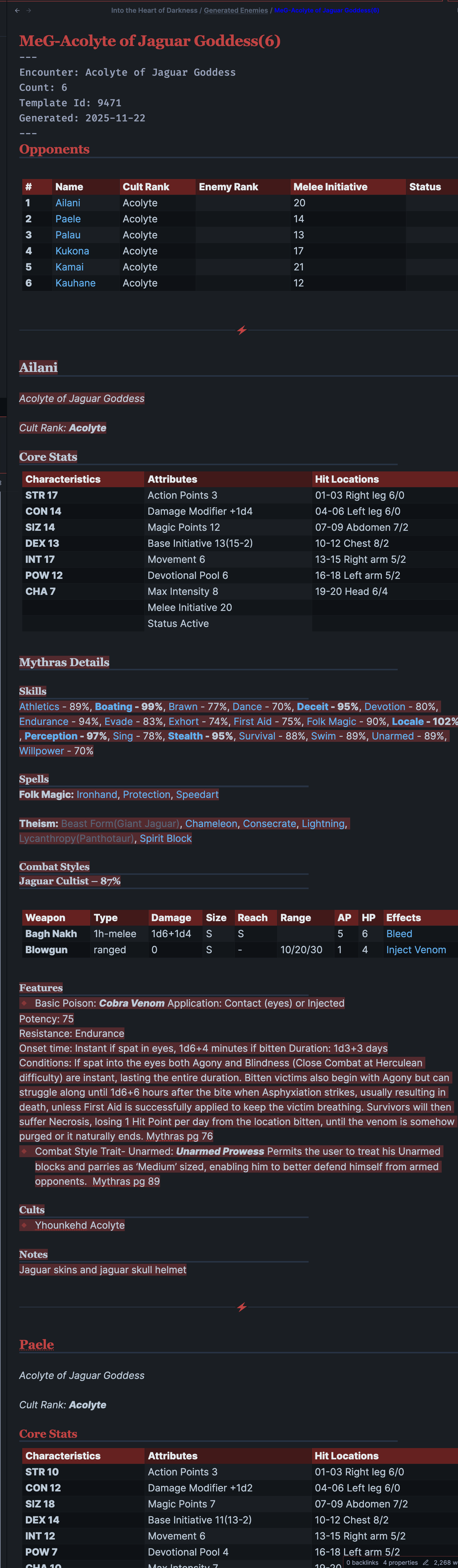
In obsidian the entries will look something like this.
Session Files panel
Every generated artifact is registered to your current browser session and listed in two groups:
Markdown — Obsidian-ready statblocks (.md); previewable and downloadable.
JSON — for VTTs or further tools (.json); direct download.
Actions:
Preview Markdown — opens a rendered view for a single .md file.
Download — fetch one file.
Remove — removes the file from this session (optionally from disk).
Download all — zip the entire session: /session-files/download-all.
Download all Markdown — /session-files/download-all-md.
Download all JSON — /session-files/download-all-json.
Session scope lasts until you close the browser/session or explicitly clear. Autodiscovery may pull in recent files on first visit when enabled.
Generated files will remain available for a few hours so download them to your machine as needed and deploy to your VTT or Obsidian.
Saving to a folder (browser support)
The “Save … to folder…” buttons use the browser’s File System Access API to let the page write multiple files directly into a folder you choose. This is currently supported in Chromium-based desktop browsers (Chrome, Edge, Brave) and only over a secure context (HTTPS or localhost).
Safari and Firefox: do not provide this API in regular browsing as of Nov 20, 2025. When you click the button, the app will download the equivalent Zip instead (e.g., “Download all”).
iOS/iPadOS Safari: the folder picker is not available; use the Zip downloads.
Zip alternative: use “Download all”, “Download all Markdown”, or “Download all JSON”, unzip in Finder/Explorer, and move the files where you want (e.g., your Obsidian vault).
Tip: If you prefer one‑click saving into a folder, open the page in Chrome/Edge/Brave on desktop.
Tips & troubleshooting
If nothing appears after Generate, check the notice above the table. You can try a lower Count.
Use Reset Filters if the table shows zero results.
On a flaky network, try again; cached data allows browsing even when offline.
Where your settings live
The hub stores your preferences (like last-used count) in your browser’s local storage.
They appear only on the same device + same browser and disappear if you clear site data.
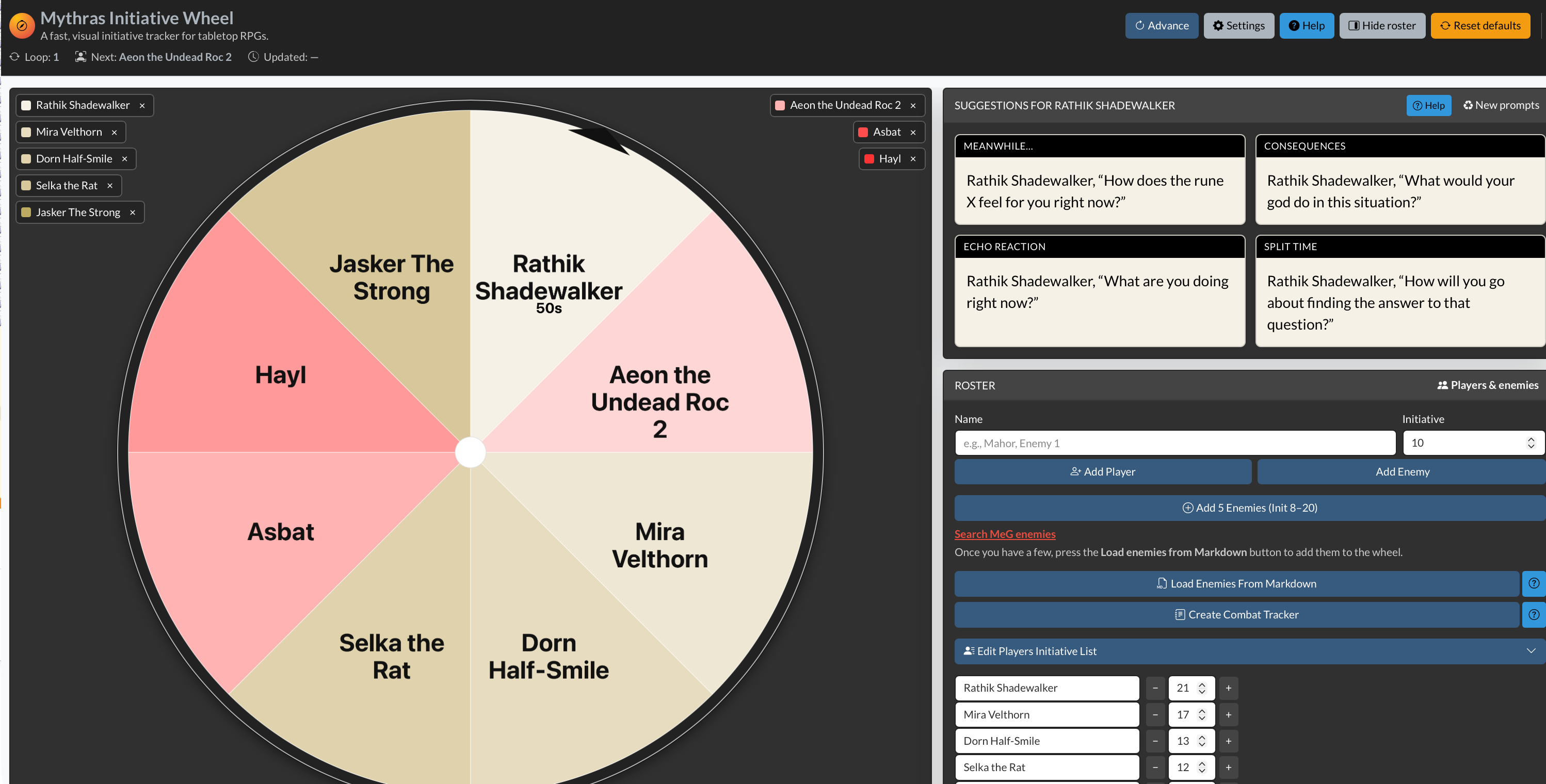
It keeps every player **equally visible** and gently reminds you when it’s time to move on. Each participant—player or enemy—sits on a bright, rotating wheel. The active slice is highlighted, and a clear turn timer (default: two minutes) shows how much “screen time” they have left.
When the timer runs out, the app nudges you: it’s time to shift the camera. You can **add or remove players and enemies on the fly**, import foes from the Mythras Encounter Generator (MEG), and let the built-in suggestion prompts give hesitant players a quick push toward a decision.
Use the Wheel when:
The party is split and you don’t want anyone to sit idle.
Social or investigative scenes risk drifting to one or two vocal players.
You want **combat turns** to stay sharp and fast-paced.
You prefer a **visual, table-facing tool** that everyone can glance at.
The Mythras Initiative Wheel doesn’t replace your judgment as GM. It simply keeps time, tracks whose turn it is, and makes sure the **story spotlight keeps moving** so every player gets their moment.
Quick Start
Open the app in your browser (desktop recommended).
Use the default roster to practice advancing turns.
Click the wheel (or the Advance button) to move to the next actor.
Open Settings to adjust turn length, sounds, or notifications.
Use the Roster panel to add or edit participants, or import enemies from MEG.
Why the Wheel Matters
Ensures **balanced spotlight time**—even when the party goes in different directions.
Keeps you aware of **when to shift attention** to quieter players.
Speeds up **social encounters, investigations, and combat** alike.
Lets enemies sit in the initiative order naturally alongside players.
The turn timer gently enforces **forward motion** and keeps scenes from dragging.
Suggestion prompts help **reduce hesitation** and spark ideas during a turn.
Interface Overview
Header Toolbar
Advance — Move to the next participant; timer resets.
Settings — Adjust turn duration, notifications, and suggestion text.
Show/Hide Suggestions — Toggle the suggestion flyout near the wheel.
Show/Hide Roster — Expand or collapse the roster panel.
Reset Defaults — Reset roster and suggestions to defaults.
Status Row
Shows the current loop/round, who is next, and when the state was last updated.
Wheel Panel
Large initiative wheel; **players** in beige tones, **enemies** in red tones.
Click anywhere on the wheel to advance to the next participant.
Click on label’s x to remove the enemy or player from the wheel
Turn timer and progress bar under the wheel.
Optional sound and desktop notifications when time runs out.
Optional **auto-advance** at timeout.
Suggestions Flyout
Shows **3 common suggestions** and **5 random suggestions** for the current/next actor.
Helps players quickly pick an action when they feel stuck.
Can be shown or hidden from the header toolbar.
Roster Panel
Add, edit, or remove players and enemies.
Import enemies directly from the Mythras Encounter Generator (MEG).
If you delete the active actor, the Wheel automatically moves to the next one.
Settings
Turn length — 5 to 3600 seconds per turn.
Auto-advance — Automatically move to the next participant when the timer reaches zero.
Play sound on timeout — Short alert sound when a turn ends.
Desktop notifications — System notifications when time runs out (requires browser permission).
Turn suggestions — Edit, reset to defaults, or save your own suggestion list so it persists.
Tips & Troubleshooting
No sound? Check “Play sound on timeout” in Settings and your system volume.
No notifications? Ensure “Desktop notifications” is enabled and that the browser has permission.
Timer not running? Reset the timer or confirm that a sensible turn length is set.
Suggestions not changing? Click Reset in Settings, or use “Reset defaults” in the header.
In 100 words
The Mythras Initiative Wheel is a fast, visual spotlight tracker for any Mythras table—perfect for split parties, social scenes, and fast combat rotations. The wheel keeps every player engaged by giving each participant a timed “beat” of attention. When their two-minute turn ends, the app gently alerts the GM to shift focus. Add or remove players and enemies on the fly, import opponents from MEG, and use built-in narrative prompts to spark instant creativity. Clean visuals, smooth pacing, and equal airtime—this tool keeps your whole table active, energized, and fully immersed in the story.
Where your settings live
The hub stores your preferences (like last-used count) in your browser’s local storage.
They appear only on the same device + same browser and disappear if you clear site data.
Preparing a session often begins with the same small ritual: open a few generators, build a handful of NPCs or factions, and sketch the tension for the coming scenes. Until now, the tools for that lived in different corners of the site. The new Generators Hub brings them under one roof so you can reach what you need without digging.
What’s new
The page at https://www.toolsfrompavis.com/generator/ now shows every Mythras and Gloranthan generator in one tidy list. Categories are clearer, labels are easier to scan, and the clutter in the sidebar has been trimmed down so navigation stays calm even on a tablet.
The hub also lets you set the “# to generate” before entering a tool. When you’re building quick lists (patrols, rumors, bystanders, faction members), this small detail speeds things up.
Why this helps
Prep usually comes in short bursts: you build three contacts, four random travelers, a tavern staff roster, and a handful of local complications. Having one page where all that begins makes those bursts smoother. You don’t need to remember which menu holds which generator; you just land on the hub, tap, and go.
How to use it
Open /generator/. Pick what you need, choose a count, and generate. Leave the hub open in a second tab if you’re building multiple pieces at once.
Where your settings live
The hub stores your preferences (like last-used count) in your browser’s local storage.
They appear only on the same device + same browser and disappear if you clear site data.
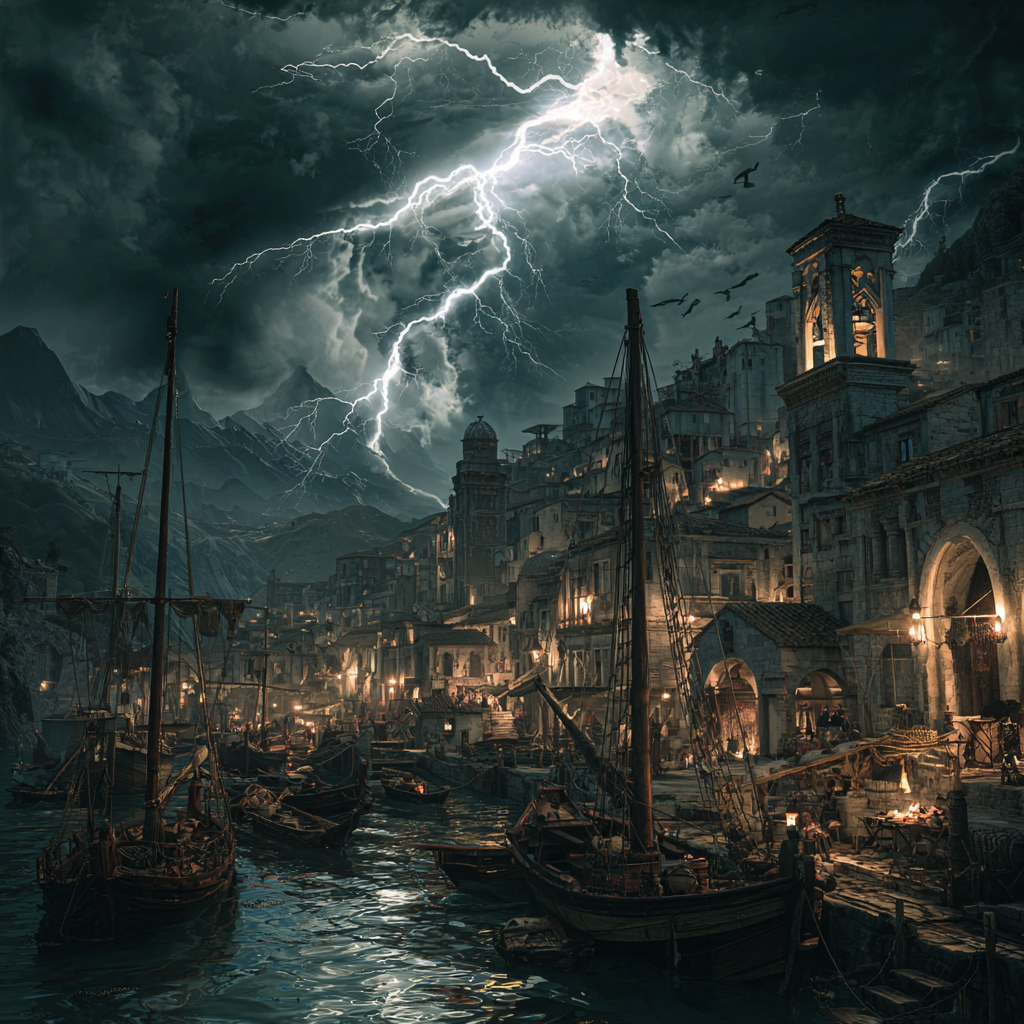
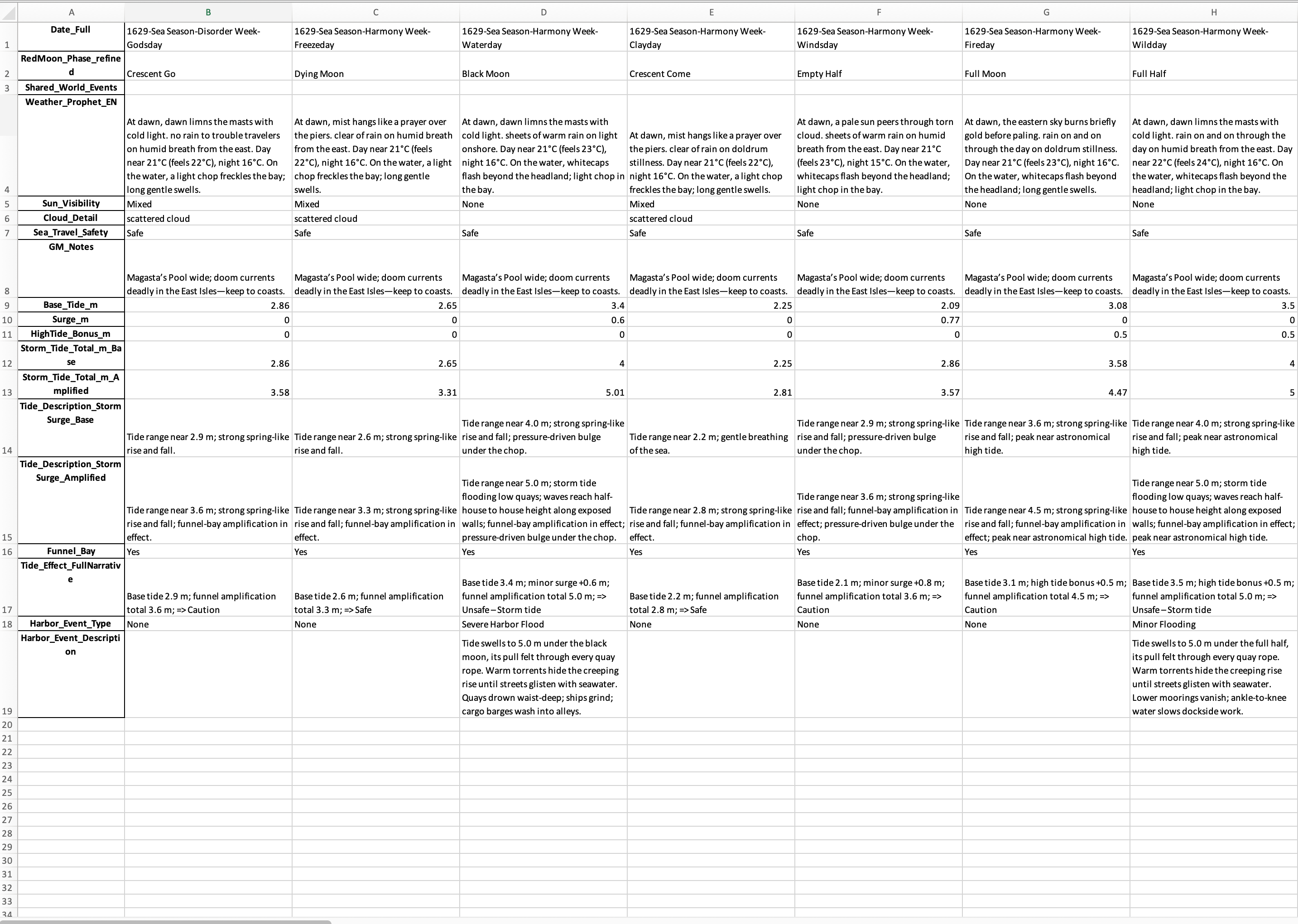
I created for my campaign a weather system using various tools. Here is a one year example for an area in Fonrit. This tries to take into account all things from Guide to Glorantha, Tradetalk articles and Men of the Sea among other things. This would fit also sword and sorcery campaign in a coastal area where there are hurricanes and typhoons or similar.
Here’s a field-by-field explanation of your weather/tides/events Excel structure, written with Gloranthan and sword-and-sorcery campaign use in mind.
📅 Date and Calendar Fields
Date_FullThe complete campaign calendar date in format Year–(Season Number Season Name)–Week Number–Day Number (e.g. 1628-(5 Storm)-8-2).👉 Serves as the master key to align with other calendars (weather, adventures, PC downtime).
SeasonThe Gloranthan season (Sea, Fire, Earth, Dark, Storm, Sacred Time).
Week_NameThe in-world cultural name of the week (e.g. Fertility Week, Disorder Week). Sacred Time has its own distinct week names.
Day_NameThe day of the Gloranthan week (Freezeday, Waterday, Clayday, Windsday, Fireday, Wildday, Godsday).
RedMoonThe current phase of the Red Moon as seen in Fonrit (crescent, half, gibbous, full, dark). Used both for atmosphere and to signal cult power levels.
🌤 Weather and Prophecy
Weather_Prophet_ENSword-and-sorcery style daily weather report, written as if spoken by an in-world character. Includes morning look, sun, clouds, winds, rain/storms, sea conditions, and temperature.
Prophet_VoiceThe speaker persona for the prophecy (Experienced Sailor, Harbor Master, City Sage, Merchant Prince, Scout, Captain of the Guard, Tavern Keep, Overheard Beggar, Working Man). This dictates tone and style of the prophecy.
Sun_VisibilityNotes whether the sun is clear, hazy, partly hidden, or obscured.
Cloud_DetailAdds descriptive granularity: wisps, stormfronts, thunderheads, fogbanks, etc.
Sea_Travel_SafetyMarked as Safe, Caution, Unsafe. Accounts for weather, tides, and storms.
GM_NotesA hidden GM-only advisory: clarifications, plot hooks tied to weather, reminders of cult holy days or factional moves.
🌊 Tide & Surge Data
Base_Tide_mThe normal astronomical tide for that day in meters (Fonrit coast baseline 2–3.5 m).
Surge_mExtra storm surge from cyclones, hurricanes, or typhoons.
HighTide_Bonus_mAdditional effect if storm surge coincides with natural high tide.
Storm_Tide_Total_m_BaseThe calculated tide height = Base Tide + Surge.
Storm_Tide_Total_m_AmplifiedA “worst case” column assuming amplification from funnel bays, shoals, or unlucky timing.
Tide_Description_StormSurge_BaseNarrative version for Base surge (e.g. “tides lap against the wharves, reaching just below the sea stairs”).
Tide_Description_StormSurge_AmplifiedNarrative version for Amplified surge (e.g. “waves climb to roof-heights, tearing loose mooring posts”).
Funnel_BayBoolean or tag whether the coastline funnels tides/storms, worsening their effect.
Tide_Effect_FullNarrativeThe storytelling text for how tides affect Hombori Tondo’s harbor: flooding alleys, breaking quays, or leaving mudflats exposed.
⚓ Harbor & Encounter Content
Harbor_Event_TypeCategory of harbor-side consequence (e.g. Flood, Dock Damage, Delay, Rumor, Cult Omen).
Harbor_Event_DescriptionFlavor text describing the event. Sword-and-sorcery tone, tying the tide/weather to gameplay (a shipwreck, a quarrel at the docks, smugglers active in the fog, etc.).
Encounter_SeedA GM-ready hook: something the PCs might run into today based on the weather, tides, and moon phase (e.g. “A baboon shaman chants on the seawall to hold back the storm, drawing a hostile crowd”).
⛈ Precipitation Code
Precip_CodeShort numeric or letter code behind the descriptive text. Used for data checks, quick filtering, or if you want to run consistency scripts (e.g. 0=clear, 1=cloudy, 2=light rain, 3=storm, 4=typhoon).
Would you like me to pull one row from the Kareeshtu file and annotate it field by field as a worked example with both prophecy voices and tide data?
Tools from Pavis tooling is now more mobile friendly and contains a dice roller
Rank and Creator Search (MEG JSON)
– Added Creator (Author) and Rank filters to the MEG JSON page.
– Author list is populated from the catalog; Rank list is shown when available in the data.
– Free-text filter now matches both encounter name and creator to make finding content easier
link to Meg Creature entry page for each row
Dice Roller (Mythras Dice Roll Evaluator)
– The Dice Roller is available on the homepage (/) for quick access.
– Mobile-friendly layout with clear inputs and results for fast, on-the-go checks.
– Designed to be lightweight so it loads quickly on shared hosts and mobile networks.
UI and Responsiveness (Web + Mobile)
– Unified layout: standardized header/footer and page shell (tools_layout.html) applied across tools for a consistent experience.
– Mobile-first styles: improved spacing, readable font sizes, and touch-friendly controls; forms and tables wrap/stack gracefully on small screens.
– Responsive tables: MEG JSON table supports horizontal scrolling on narrow devices; key columns are prioritized; long text is truncated with tooltips.
– Cleaner forms: simplified tag/author/rank selectors; consistent button labels (Search, Generate, Copy JSON) and disabled/empty states.
– Result subpage: the generated encounter JSON opens in a dedicated, lightweight result view for easier copying and sharing.
– Accessibility improvements: better contrast for links/buttons, larger click targets on mobile, and more descriptive titles and labels.
– Performance: batched API endpoint (/megjson/?api=creatures) enables incremental loading and keeps the first render fast on mobile networks.
User Impact
– The MEG JSON page should now populate consistently with the full catalog when network access is permitted.
– The interface is cleaner and more consistent across pages, and easier to use on phones and tablets.




 Notes From Pavis