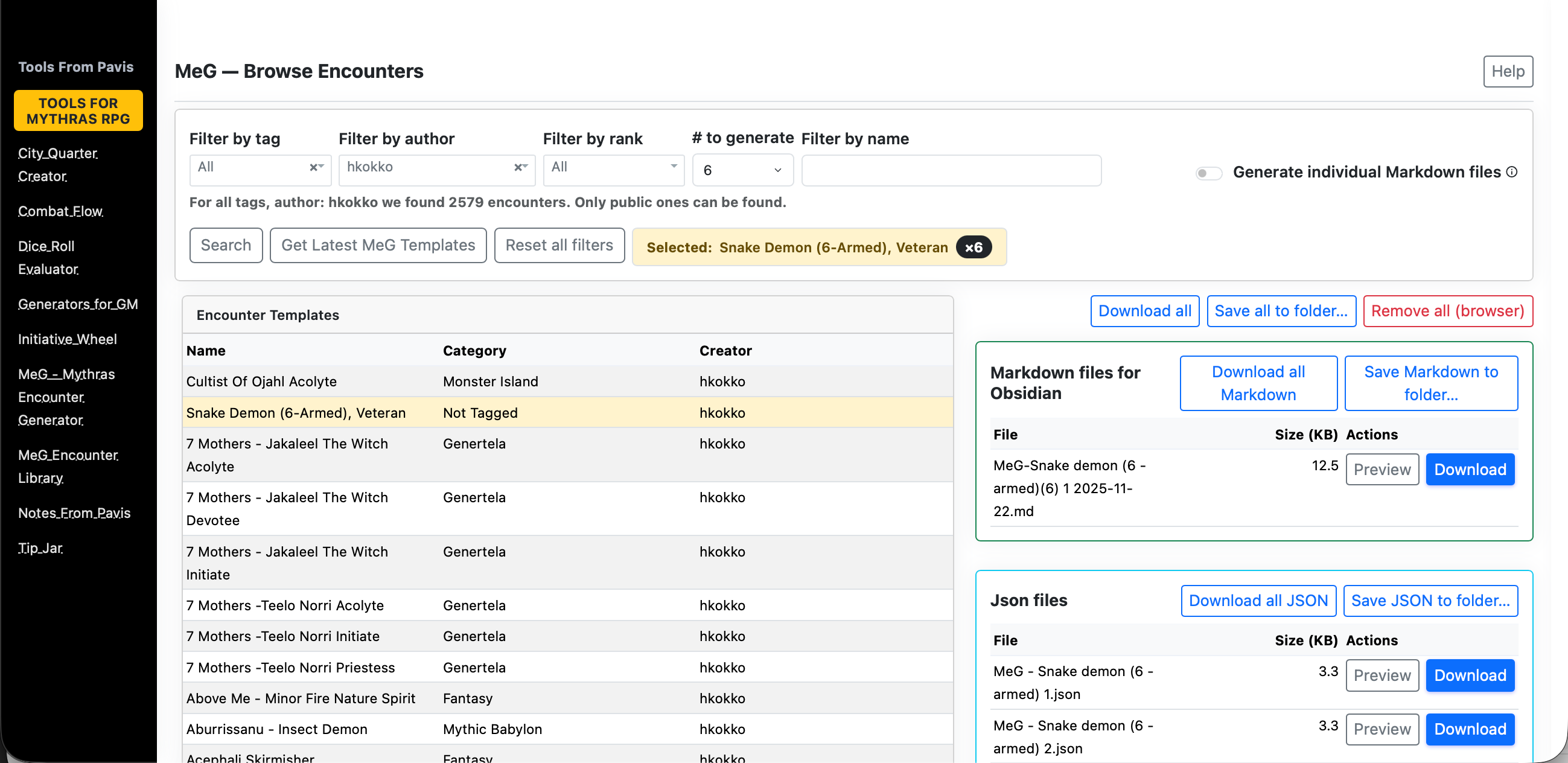
The MeG Encounter Library at https://www.toolsfrompavis.com/megjson/ has been enhanced to pull ready-to-run Mythras opponents into our prep. This update focuses on reducing friction: clearer browsing, predictable filtering, reliable generation, and smoother hand-off into Obsidian or your VTT. Everything you create stays tied to your current browser session, so prep flows naturally from idea → statblock → notes.
Overview
The MeG Encounter Library lets you browse and filter a catalog of ready-to-run Mythras opponents and creatures, then generate encounter artifacts (Markdown and JSON) for use in your session.
- Browse with filters by Tag, Author, Rank, and Name contains.
- Select an entry and choose how many opponents to generate (1–8).
- Generate to produce Obsidian-ready Markdown and JSON into the current session.
- Manage your session’s files: preview, download, zip, or remove.
Quick start
- Go to MeG Encounter Library.
- Type a few letters in the Name field or pick a Tag/Author/Rank.
- Set count – default is currently 6. Click a row to select it
- Find the created files in the Session Files panel; download or preview as needed.
- The selected filters stay in your browsers’ local storage.
Browsing and filtering
- Name contains — free-text filter that matches encounter names.
- Tag — category/tag dropdown (“All” shows everything public).
- Author — authors available under current Tag/Rank/Name filters.
- Rank — available ranks under current Tag/Author/Name filters.
Reset Filters clears all filters back to defaults.
Refresh Catalog forces a fresh reload of the MeG catalog (bypassing cache).
You can also produce markdown either one enemy at the time or multiple using selection button.
Selecting and generating
- Click a table row to select an encounter. The row becomes highlighted and selected number of enemies in both markdown and json is generated
- Your current filters, sorting, and page are preserved when selecting a row — selecting does not change filters.
- Even if your filters would normally hide the selected row, it will stay visible at the top until you change the selection.
- Count — number of opponents to generate (1–8). Values outside this range are clamped.
- Name override — optional; if provided, it is used as the output name.
If the backend can only produce a partial set (e.g., 2 of 4), a notice appears. You can retry to fill the rest.
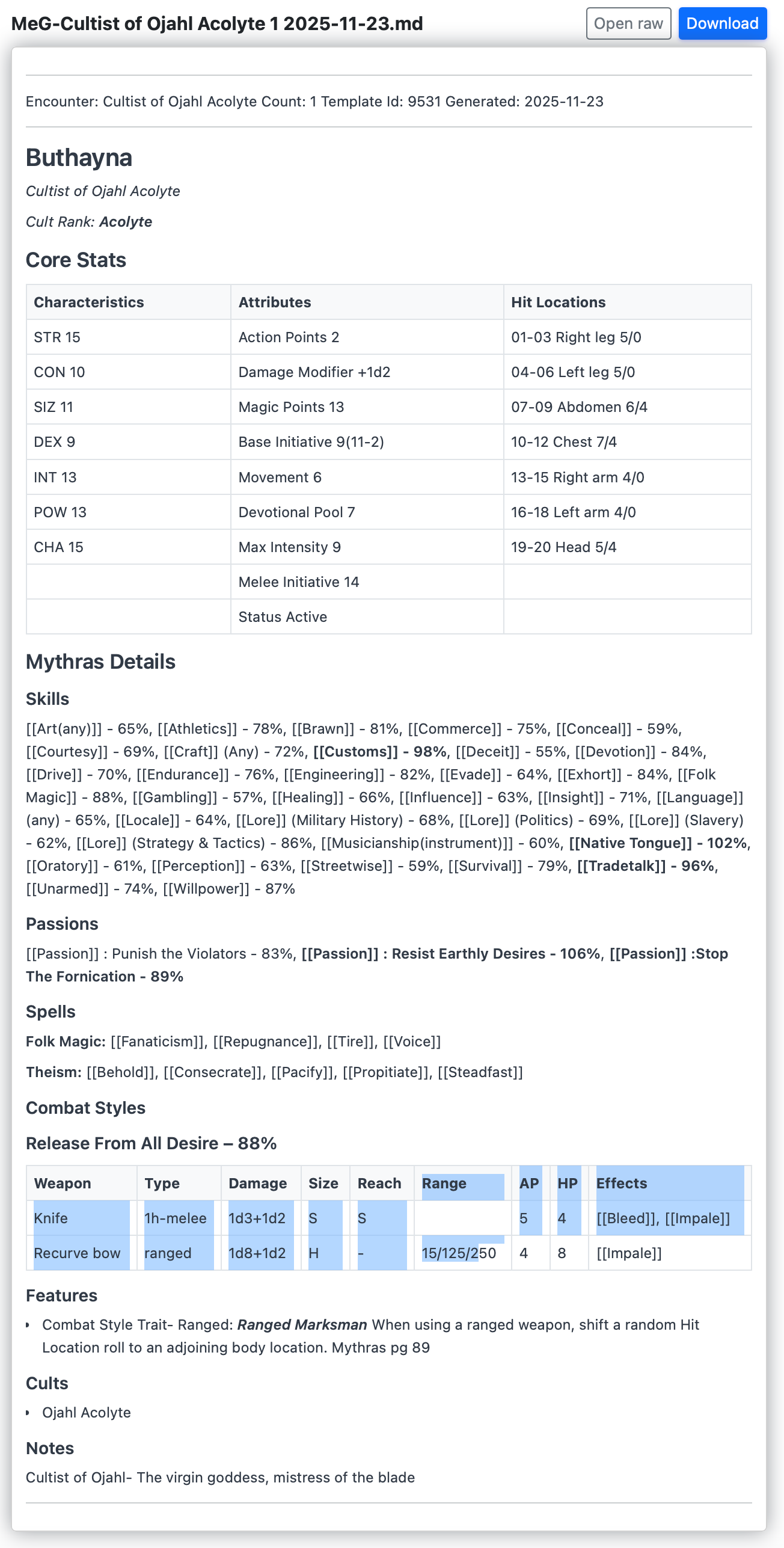
The preview of markdown looks like this.
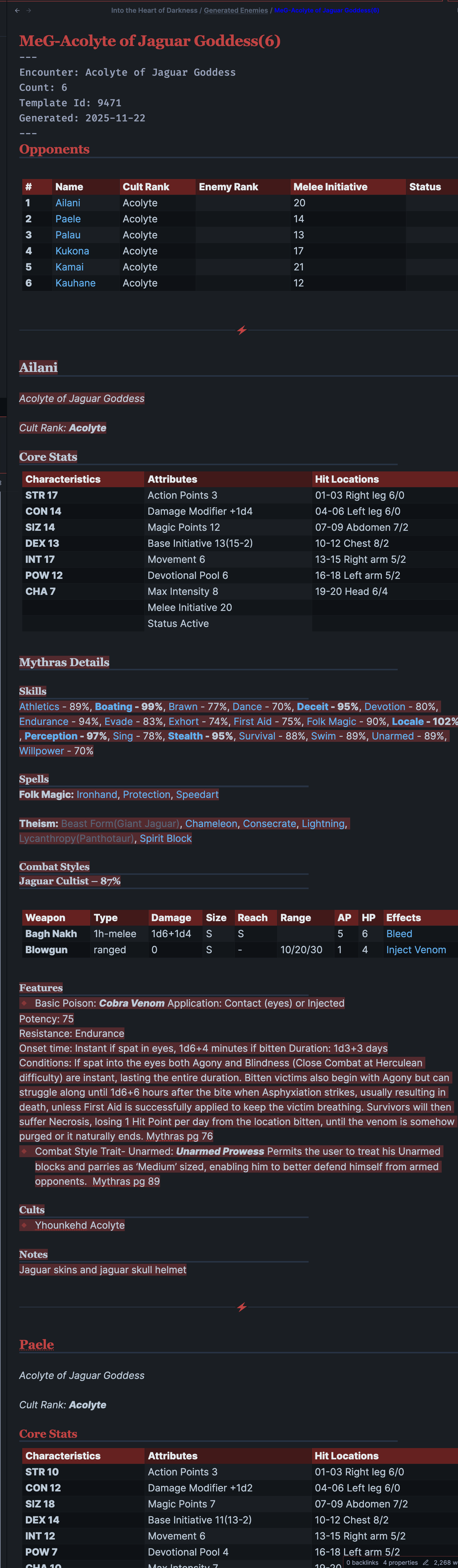
In obsidian the entries will look something like this.
Session Files panel
Every generated artifact is registered to your current browser session and listed in two groups:
- Markdown — Obsidian-ready statblocks (.md); previewable and downloadable.
- JSON — for VTTs or further tools (.json); direct download.
Actions:
- Preview Markdown — opens a rendered view for a single .md file.
- Download — fetch one file.
- Remove — removes the file from this session (optionally from disk).
- Download all — zip the entire session:
/session-files/download-all. - Download all Markdown —
/session-files/download-all-md. - Download all JSON —
/session-files/download-all-json.
Session scope lasts until you close the browser/session or explicitly clear. Autodiscovery may pull in recent files on first visit when enabled.
Generated files will remain available for a few hours so download them to your machine as needed and deploy to your VTT or Obsidian.
Saving to a folder (browser support)
The “Save … to folder…” buttons use the browser’s File System Access API to let the page write multiple files directly into a folder you choose. This is currently supported in Chromium-based desktop browsers (Chrome, Edge, Brave) and only over a secure context (HTTPS or localhost).
- Safari and Firefox: do not provide this API in regular browsing as of Nov 20, 2025. When you click the button, the app will download the equivalent Zip instead (e.g., “Download all”).
- iOS/iPadOS Safari: the folder picker is not available; use the Zip downloads.
- Zip alternative: use “Download all”, “Download all Markdown”, or “Download all JSON”, unzip in Finder/Explorer, and move the files where you want (e.g., your Obsidian vault).
- Tip: If you prefer one‑click saving into a folder, open the page in Chrome/Edge/Brave on desktop.
Tips & troubleshooting
- If nothing appears after Generate, check the notice above the table. You can try a lower Count.
- Use Reset Filters if the table shows zero results.
- On a flaky network, try again; cached data allows browsing even when offline.
Where your settings live
The hub stores your preferences (like last-used count) in your browser’s local storage.
They appear only on the same device + same browser and disappear if you clear site data.
To clear them, remove site data for: http://www.toolsfrompavis.com
For other tools, charts and tables go to Mythras Charts and Tables
Visit also Mythras Encounter Generator to create templates for your encounters and enemies

 Notes From Pavis
2 thoughts on “MeG Encounter Library — Faster Encounters, Cleaner Markdown for Obsidian and JSON”